



Unable to change margins in acrobat reader free version
Hi all
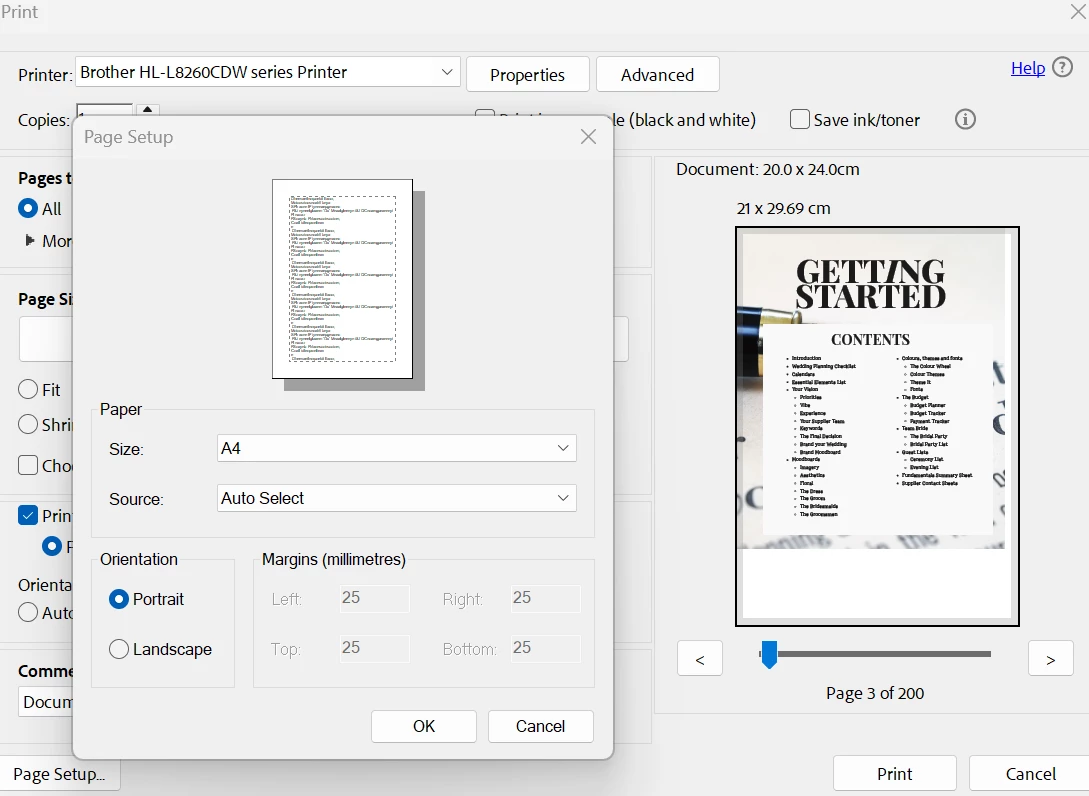
I’m having a mare with reader and margins. I have a large pdf that I need to print on A4 and then trim to size. Reader won’t let me change the margins in page setup - they are greyed out, and there is no ‘manage custom sizes’ in there like the help function says there is. When I print to actual size, as that’s what I need it to do, it places the images etc right at the top and left of the page which means its cutting off some of the print due to printer margins. ie its printing borderless when my printer doesn’t do borderless. Shown in the image - you can see the print preview shows it right at the edge of the paper. I’ve tried adjusting the binding offset in my printer settings but that’s not changing the adobe print preview
I need it to print in the centre of the page but I can’t seem to find a way to do that. Any ideas please? Driving me nuts. Thanks in advance

 AdChoices