


Participating Frequently
Jan 25, 2018 5:53 PM UTC
Question

Unable to change select tool or highlighter size, therefore, unable to select single line of text

Using Adobe Acrobat DC Pro, intending simply to highlight a single line of text, the selection frame is HUGE and I'm unable to select a single line of anything.
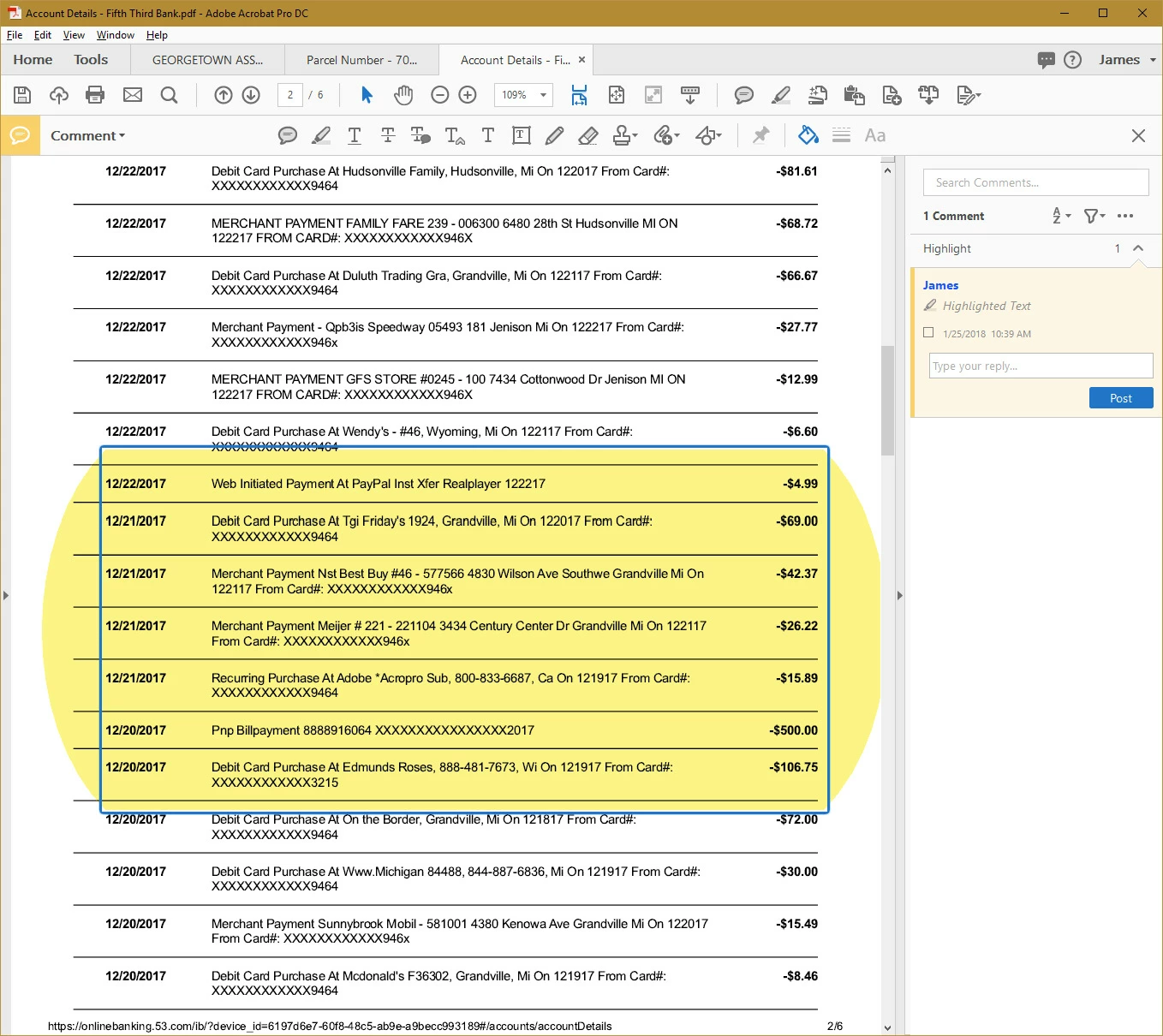
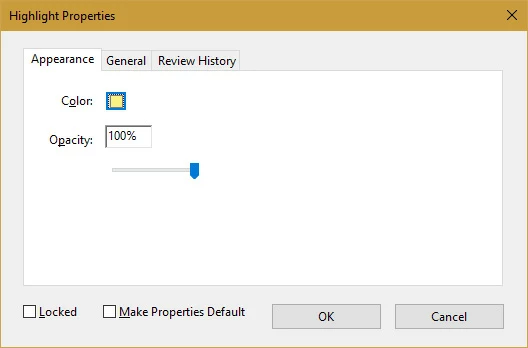
When accessing selection properties (right-click>properties), the only (Appearance) options available are for color and opacity - not sizing.
What little I find in tutorials, self-help support, and community forums indicates I should be able to "grab handles", but no handles ever show up or become available.

Suggestions?  Solutions?

Thanks!

This topic is closed to new replies. Start a new post to keep the conversation going.

25 replies

Jeff370
Participating Frequently
Sep 28, 2023 6:15 PM UTC

YES. The Highlighter selection area needs a preference to make it smaller or the ability to resize the selection area. When I am working on single lines with no spacing, I have to enlarge the screen, where it looks like 96 96-point size to highlight. 

 
Something Adobe needs to work on. 

Does Adobe ever listen to their customers? 

Translate
Participant
Aug 16, 2019 7:00 PM UTC

I was still having the same issue as reported above (huge cursor/highlighter) when trying to print a web page as a PDF.  I have figured out that it only happens when I use "Print to PDF".  If I switch to "Save as PDF" (for the same exact web page), it seems to work fine...I am then able to highlight only one line at a time in the resultant PDF (and also select one line at a time with the cursor/selection tool ).   Hope this somehow helps someone.  

Translate
Participant
Mar 23, 2021 3:51 PM UTC

I encountered this issue suddenly yesterday. Prior I was able to print or download or save without any highlighting issues. Today I have found that I have to use the Pring to PDF function in order to be able to select lines of text for highlighting or copying. I hope this helps someone else.

Translate
Participant
Jul 10, 2021 2:55 PM UTC

After lots of frustration and experimentation with this issue, here are my observations.

The problem usually occurs with "Print to PDF" from a web page or other non-Adobe source. 

If you select "Edit PDF" in the saved document, you will see that there are multiple overlapping text boxes often with different size/types of text in each box.

If you try to "select" text from one of these overlapping text boxes, it apparently puts the program into a state of uncertainty about what it being selected, so you get bizarre results.

Best solution is to print the orignal document to a non-Adobe source, e.g., Microsoft XPS Document Writer. 

Once that is done, you can "Print to PDF" from the converted, non-Adobe document and, from my experience, always get a "normal," text-selectable PDF.

Translate
Participating Frequently
Apr 29, 2019 7:33 PM UTC

Has any one resolved this issue? I am having the same issue...

Translate
Sail East West
Participant
Sep 3, 2018 6:12 PM UTC

I also have this problem as described by the other above and it began within the last 2 weeks.  Today I selected "Save as PDF" instead of printing.  The resulting PDF seems to behave normally now. 

Translate
niftynici
Participant
Aug 21, 2018 3:21 PM UTC

I have the same issue!! The highlighter tool used to work, and now it's GIGANTIC! Help!!

Translate
skyfly99
Participant
Aug 30, 2018 5:52 AM UTC

I'm having the same problem myself. I print a page to PDF then save and then try highlighting and its huge and annoying. Please help with this problem. It worked just fine before.

Translate
riazh3739085
Participant
Mar 19, 2018 6:50 AM UTC

I  got the same problem as you.

This problem started around about January 2018. Before that I could highlight single lines.

Translate
Document Geek
Community Expert
Community Expert
Jan 25, 2018 8:17 PM UTC

Grab handles do not appear on highlighter marks, only on stamps or drawing markups.

Can you try selecting the text with the hand tool (Make sure  and then right-click, highlight text. Make sure you have your preferences set to allow the hand tool to select text.

Translate
Participating Frequently
Jan 25, 2018 9:14 PM UTC

Thanks for responding and asking for details, Document Geek!

No ... although I have the same settings as you, I cannot select text with the hand tool.

I've considered "help>repair installation", just to reset some things back to defaults.  (Perhaps something was changed unintentionally or an add-in feature/update corrupted something.)

Translate
Participating Frequently
Jan 25, 2018 9:28 PM UTC

Just FYI ... "Help>Repair Installation" did not change anything.  Still huge.

Translate