
Participating Frequently
Nov 20, 2026 5:25 AM UTC
Question

Unable to copy information from Adobe and use special paste in Office programs

Hello all,


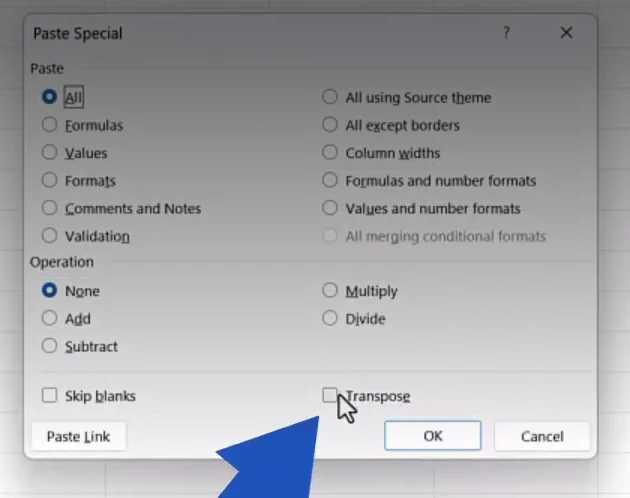
Just want to confirm if there is a setting that can be changed to allow information to be copied from PDF’s and then be pasted into Office applications (word or excel) using the special paste option to keep the format.


For example we have a user that is trying to copy information from a table in a PDF and paste it into Excel but keep the formatting, how ever there is no option to use the Office special paste option.

This is the option that we get when trying to use the special paste:
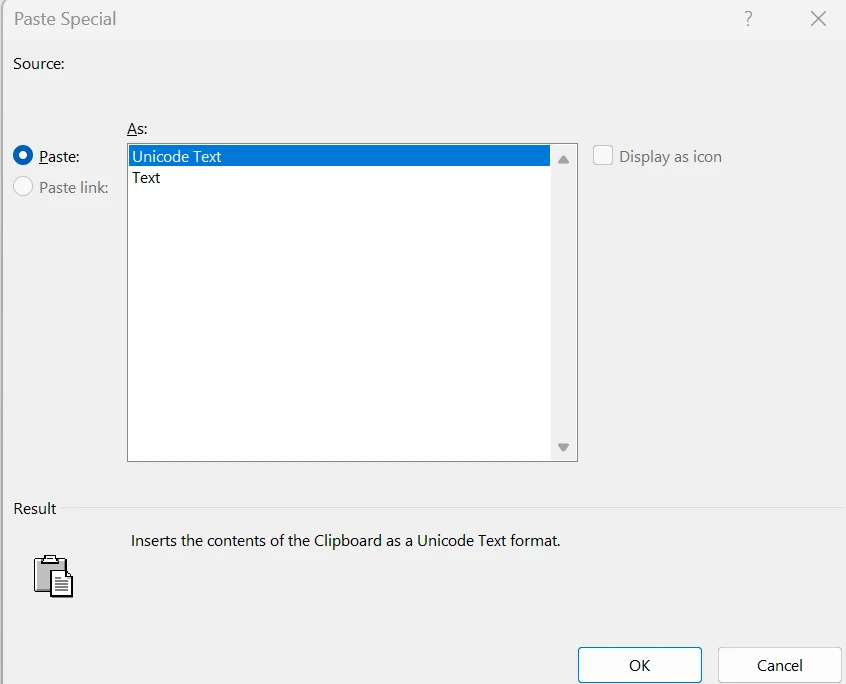
 

The menu we are looking for is the one below, specifically the Transpose option:


Your assistance is appreciated.

    1 reply

    Meenakshi Negi
    Community Manager
    Community Manager
    Nov 20, 2026 6:52 AM UTC

    Hi DJ37004828acld,


    Thank you for reaching out, and sorry for the trouble caused.

    If you are referring to the settings in Acrobat, please note that there is no option to make changes to the settings. You can find information about copying content from PDFs in the following help document: Copy content from PDFs. Since the options you mentioned appear in the MS Office application, we recommend reaching out to their support team for assistance.

    If you were referring to something else, let us know.


    Thanks,

    Meenakshi

    Translate