Hi - I’m reposting this question because similar postings are now closed.
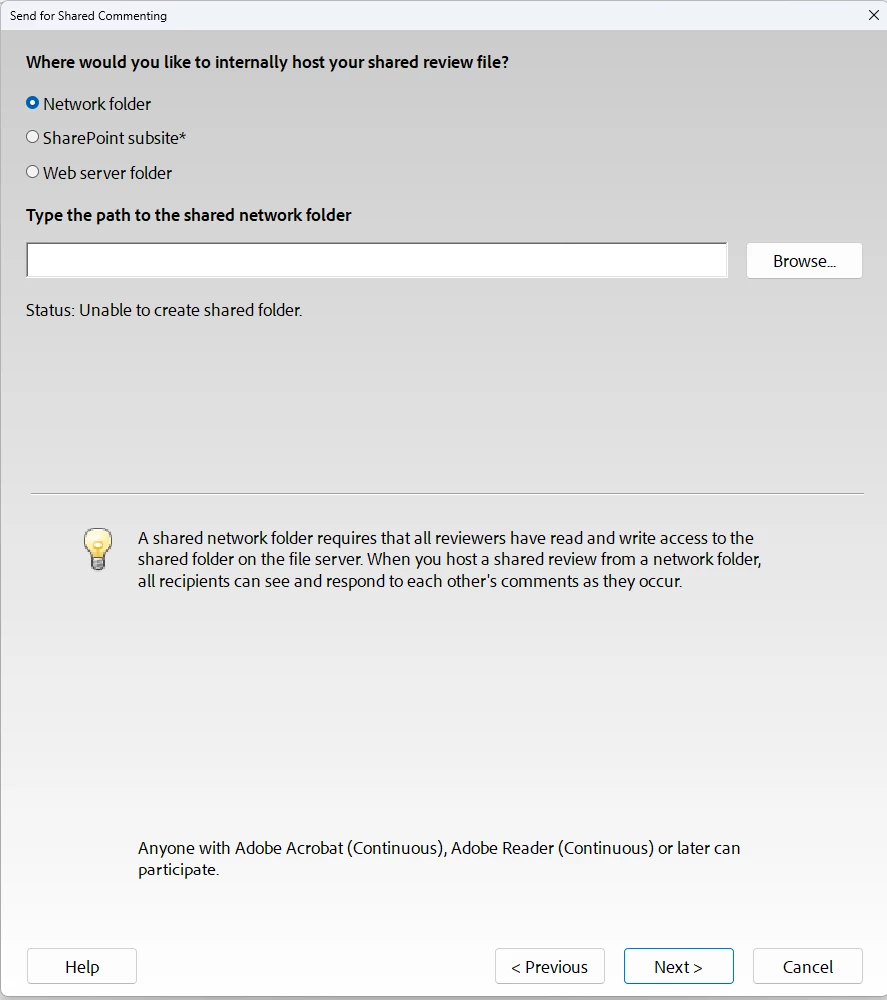
I got a new PC at work and the IT department had to reinstall all of my programs. When I went to send a shared review via Adobe Acrobat today, I immediately saw this dialog box, which is new to me:
We don’t now use SharePoint, so I kept the default, Network folder, and typed the path to my network folder. I got the error message, “Unable to create shared folder.”
I read the posts about Enhanced Security and disabled those options temporarily, but I still get the error message.
@Amal Jaiswal - I heard back from IT and here are their answers:
Question 1
Can you or IT confirm the Windows account running Acrobat has both read and write permissions on that exact subfolder (…\NightEye FAQ\V2), not just the parent folders? A quick test is creating and deleting a test file there directly in File Explorer, using the same login Acrobat runs under.
Answer: I can confirm that the Windows account running Adobe has read and write permissions on that subfolder. I use these folders daily. The reviewers have the same access as me.
Question 2:
Does the same error happen if that network path is mapped to a drive letter first, then Acrobat points to the mapped drive instead of the raw \\server\share path?
Answer:We cannot do this on our network since the mapped drive is insecure.
Question 3:
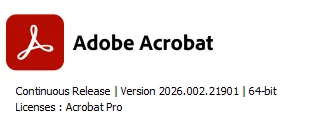
Which exact Acrobat version and build is currently installed (Help > About Adobe Acrobat)? That will help confirm whether a single "Automatically collect comments on my own internal server" option is expected for this version and deployment, or whether something's missing.
Answer: This is my version:
Question 4: Was this copy of Acrobat installed through a standard IT deployment package, or a normal installer? Enterprise deployments sometimes limit which delivery and collection options appear.
Answer: Our IT department installed through a normal installer via Adobe Creative Cloud.
@Amal Jaiswal - I heard back from IT and here are their answers:
Question 1
Can you or IT confirm the Windows account running Acrobat has both read and write permissions on that exact subfolder (…\NightEye FAQ\V2), not just the parent folders? A quick test is creating and deleting a test file there directly in File Explorer, using the same login Acrobat runs under.
Answer: I can confirm that the Windows account running Adobe has read and write permissions on that subfolder. I use these folders daily. The reviewers have the same access as me.
Question 2:
Does the same error happen if that network path is mapped to a drive letter first, then Acrobat points to the mapped drive instead of the raw \\server\share path?
Answer:We cannot do this on our network since the mapped drive is insecure.
Question 3:
Which exact Acrobat version and build is currently installed (Help > About Adobe Acrobat)? That will help confirm whether a single "Automatically collect comments on my own internal server" option is expected for this version and deployment, or whether something's missing.
Answer: This is my version:
Question 4: Was this copy of Acrobat installed through a standard IT deployment package, or a normal installer? Enterprise deployments sometimes limit which delivery and collection options appear.
Answer: Our IT department installed through a normal installer via Adobe Creative Cloud.
Hi @mary_n_fingerlakes thanks for trying out the suggestions and sharing the updates. We have escalated this to our development team for further analysis. We will keep you posted on the updates as soon as we get any information.
I hope you are doing well, and thanks for reaching out, and sorry you had to repost this after the earlier threads closed. Thanks also for the clear screenshots, that's the "Send for Shared Commenting" dialog and confirms you're on Acrobat Pro, Continuous Release, version 2026.002.21901, 64-bit.
Since disabling Enhanced Security/Protected Mode temporarily didn't clear the "Unable to create shared folder" status, a couple of other things are worth checking:
Path format: When you type the path into that field, are you using the literal file server name (like \servername\share\folder), or a DNS alias or mapped drive letter (like Z:\folder)? This exact error occurs when an alias or mapped drive is used instead of the actual server name.
Permissions: outside of Acrobat, can you confirm you (and ideally another reviewer) have read and write access to that exact folder, for example by creating a test file there directly in File Explorer? The dialog itself notes reviewers need both read and write access to that folder.
Since this is a newly reinstalled machine, it's also worth double-checking that the network folder is accessible from this new PC at all (mapped/connected) before Acrobat tries to write to it.
Let us know what you find on the path format and permissions, and we'll go from there.
Thanks for checking, that's very useful. The path you're seeing, \company name\data\Engineering\Parts\Parts Data\1234567\Review\V3, does look like a DFS namespace alias rather than the literal file server name, since "company name" there is a friendly network-wide path Windows resolves behind the scenes, not an actual server hostname. That matches the known cause for this exact "Unable to create shared folder" error, Acrobat's shared review feature needs the real server name, and doesn't resolve DFS aliases the way File Explorer does.
Since permissions are already confirmed fine on your end, the next step would be getting the actual physical server name behind that alias. That's usually something your IT/network team can confirm quickly (they'd know it as the DFS target or the underlying file server hostname). Once you have that, try building the path as \actualservername\data\Engineering\Parts\Parts Data\1234567\Review\V3 and entering that directly in the "Type the path" field instead of pasting the alias version.
Let us know if that resolves it once you have the real server name from IT.





 AdChoices