


Participant
May 7, 2023
Answered

Unable to find snapshot tool in Acrobat Reader 2023

  • May 7, 2023
  • 49 replies
  • 195542 views

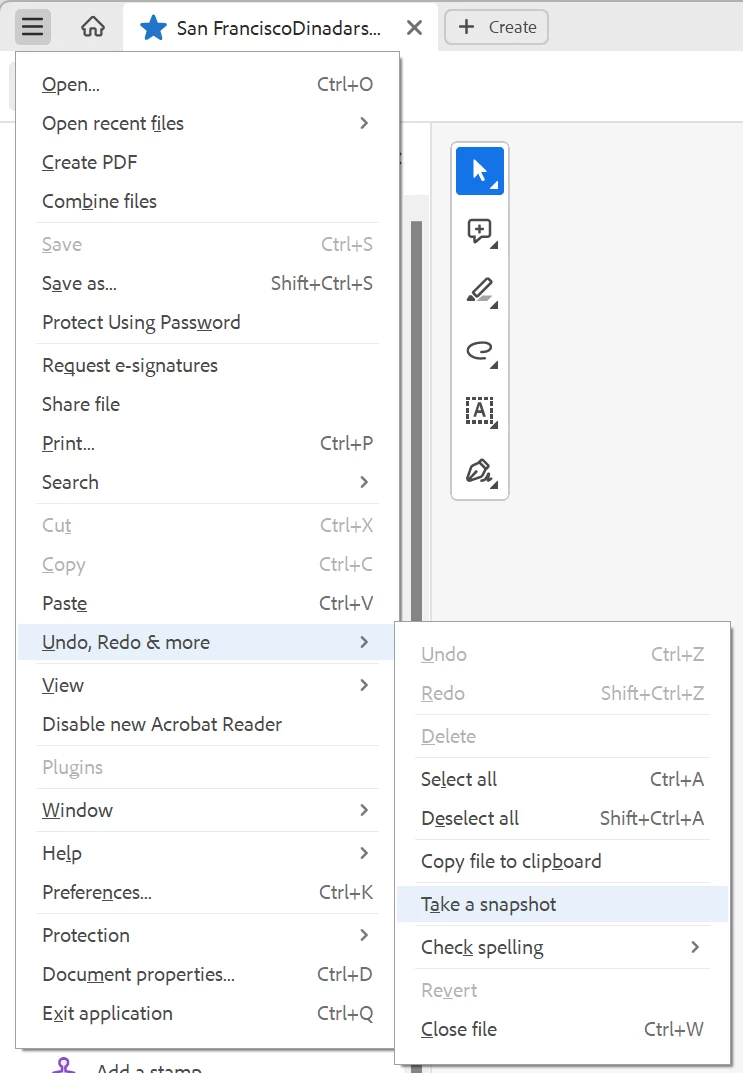
Acrobat Reader 2023 changed menu layouts and snapshot tool cannot be found. Find tool in top right says "Find text or tools" but it cannot find snapshot tool. Any ideas how to take snapshot in Acrobat Reader 2023?
    Correct answer Zendu

    Snapshot has been moved to unified File menu -> Undo, Redo & More -> Take a snapshot.


    Such a radical change in UI should have been accompanied by documentation update. But the documentation still refers to old ways.

    49 replies

    Participant
    December 26, 2024

    I am paying for Adobe. I am tired of this. I hate this progam which becomes harder every time they touch it. I give up. I will cancel my subscription and find an easier editor to use.

    Participant
    December 27, 2024

    I suggest PDFGear, a neat little esitor with a simple and straightforward UI.

    For a more customisable UI, PDF-Xchange Editor outdoes them all.

    Participant
    May 8, 2024

    Hi, just to add, i was also looking to find the snapshot tool shortcut, thanks for providing the solution. Alternative is to select the image using the select tool, and choose copy image. 


    Meenakshi_Negi
    Legend
    May 8, 2024


    Hi All,


    Thank you for reaching out.


    In the new version, the "Take a Snapshot" tool is available under the Menu > Undo, Redo & more. You can also select the area/ image in the PDF using the select tool and right-click on it. You will get a pop-up with the option to take a snapshot.

    Refer to the screenshot below:


    Let us know if you have any questions.


    Thanks,

    Meenakshi


    Marking a reply or response "Correct" will help future users with the same issue quickly identify the correct answer.

    Participant
    October 29, 2024

    That option only lets you Take A Snapshot. If you want to sent to the Snapshot to Print, you still have to go through the Menu>Undo etc etc. How come we can't have a shortcut icon for this on one of the Toolbars?

    Participant
    March 25, 2024

    Hidden in an "Undo, redo & other things" submenu is ridiculously out of the way. We used to have it in the page contextual menu so accessible in two clicks anywhere. Adobe has been worsening Reader more and more since the beginning, that's why I've been using PDF-Xchange Viewer, that's an app with an efficient and customisable interface.

    Participant
    March 12, 2024

    The new location of the snapshot tool in Acrobat makes it a pain to use now.

    I recommend using the "Snipping Tool" or "Snip & Sketch" in Windows. It works with anything you see on your screen, and it can be pinned to your Windows Taskbar.  Its also great for adding images to a PowerPoint.

    Participant
    March 12, 2024
    Thank you for the tip about the Snipping Tool!

    *Kelly Swertfager*
    7407 N. Woodson Avenue
    Fresno, California 93711
    559-435-3527 Home
    559-970-7414 Cell
    Participant
    March 7, 2024

    You can now find the "take a snapshot tool" in the default Select tool/ the white arrow "Right Click" context menu. You can right click anywhere and find it in the middle of the menu.

    Good work to the Adobe team.

    Participant
    February 29, 2024

    It is now available in the mouse Right Click. This is awesome.


    Participant
    February 29, 2024
    Thank you! I'll give it a try.

    *Kelly Swertfager*
    7407 N. Woodson Avenue
    Fresno, California 93711
    559-435-3527 Home
    559-970-7414 Cell
    Participant
    November 16, 2023

    so effing annoying


    Participant
    October 30, 2023

    I couldn't locate an option to add a "Snapshot" feature directly to the toolbar in this version, which is very disappointing.


    However, I've found a workaround to avoid sifting through numerous menus.

    When you're in select mode (as opposed to pan mode), you can activate "rectangular select" over "text select" by dragging with the "Ctrl" key pressed, even if you're hovering over text. Once you've made the rectangular selection, right-click and choose the "Take a Snapshot" option.

    Participant
    January 11, 2024

    I have also found that if you are in "pan" mode, you can simply right click anywhere on the page and the menu has the "take a snapshot" option there. Much faster than going through the menu. Hope this helps someone. I use it a lot to print certain sections of a page. 

    Participant
    February 12, 2024

    I don't see snapshot after r-click.

    Participant
    October 20, 2023

    Adobe is f***ing garbage.  Useless cra*.  I found Foxit PDF to be WAY WAY better.  Everyone, ditch Adobe.  Go to Foxit PDF.  I highly recommend it

    Participating Frequently
    October 17, 2023

    Can you developers at Adobe please stop mucking around with the menus and toolbars.  Improve the features and technology by all means but can you just stop mucking about with the user interface.  Some dude in the develpment team seems to think it is a good idea to moved stuff around in each new version.  That seriously reduces user efficiency and workflow speed.