


Participant
August 22, 2026
Answered

Unable to install Acrobat Reader error code 25

  • August 22, 2026
  • 6 replies
  • 45 views

Hi,

I tried to download the free acrobat reader initially, it would not install or launch. I got the page which states ‘Thank you for downloading Acrobat Reader’ and guiding me to signup for a free trial. I signed up for a free trial, I got this: 
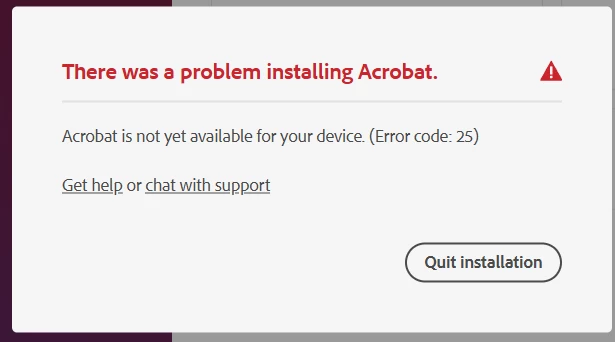
I have tried all the Troubleshooting tips.


Many Thanks

    Correct answer Meenakshi0101

    Hi happy_user13a1,


    Sorry to hear that the suggestion didn’t help.

    Acrobat Reader should be installed on the machine. It is not a web-based service. Please try reinstalling with the help of the steps and link suggested below:

    • Uninstall/ remove the application and run the cleaner tool from the following link: Acrobat Cleaner tool.

    • Reboot the machine. 

    • Install Adobe Acrobat from the following page: Install Reader.  

    Let us know how it goes.


    Thanks,

    Meenakshi

    6 replies

    Participant
    August 26, 2026

    Hi Meenakshi,

    It has worked this time, thanks do much for your help!

    Meenakshi0101
    Community Manager
    Community Manager
    August 26, 2026

    Hi happy_user13a1,


    That's great! I'm glad to know it worked. Thank you for updating us.

    Please let us know if we can assist you further.


    Thanks,

    Meenakshi

    Participant
    August 25, 2026

    Thank you, I have tried this and it and the app will still not install on my computer. The Adobe Express Photos installs and launches every time with no issues. I have Windows 11. Could I just ask, should the app be installing on my computer or is Adobe Acrobat Reader now fully web-based? The reason I ask is that the newer web-based version of the Reader doesn’t have the functionality that I require. 

    Many Thanks

    Meenakshi0101
    Community Manager
    Meenakshi0101Community ManagerCorrect answer
    Community Manager
    August 25, 2026

    Hi happy_user13a1,


    Sorry to hear that the suggestion didn’t help.

    Acrobat Reader should be installed on the machine. It is not a web-based service. Please try reinstalling with the help of the steps and link suggested below:

    • Uninstall/ remove the application and run the cleaner tool from the following link: Acrobat Cleaner tool.

    • Reboot the machine. 

    • Install Adobe Acrobat from the following page: Install Reader.  

    Let us know how it goes.


    Thanks,

    Meenakshi

    creative explorer
    Community Expert
    Community Expert
    August 24, 2026

    @happy_user13a1 I 100% agree do use th Adobe Claner tool, as it will help deep‑clean and removes broken installs, leftover files, and corrupted components so you can reinstall your app. 

    Also, I would check the system requirments for Adobe Acrobat Reader too. 
    https://helpx.adobe.com/ca/reader/desktop/system-requirements.html

    m
    Meenakshi0101
    Community Manager
    Community Manager
    August 24, 2026

    Hi happy_user13a1,


    Thank you for reaching out, and sorry for the trouble experience.


    Please try the steps outlined in the following help document: "Error 25 causes installation failure."

    Before you begin, make sure to remove any older installations from your machine. To do this, run the cleaner tool on your machine. If you are using a Mac, please remember to empty the Trash folder as well.


    Let us know how it goes.


    Thanks,

    Meenakshi