
Unable to install Adobe Acrobat Pro 2017 on Win 10
My company has purchased a multi licence Adobe Pro 2017 but the installation is not possible on every computer. not that we have exceeded the number limitations of the activation key.
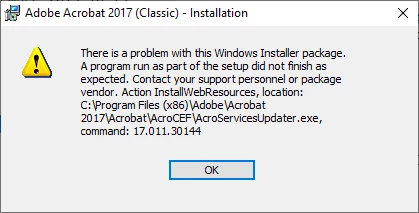
When Prompted to install, the process evoles but stops with the following information. So the program never get installed on the computer. I have the below information.
Adobe Acrobat 2017 ( Clasic) Installation
There is a problem with this Windows Installer package. A program run as part of the setup did not finish as expected. Contact your support personnel or package vendor. Action InstallWeResources, location: C:\Program Files (x86)\Adobe\Acrobat2017\Acrobat\AcroCEF\AcroServicesUpdater.exe, Command: 17.01.30144
I did all the I can, downloard the Visual Studio 2013 and updates my OS many times, Cleaned the cache but unable to complete installation. while at the same time I can be installed on other computers.
I'm using a Windows 10 Professional 64 bits
I really used up my assests.
I look forward to hearing from you
Epiphane A
Thanks for yoru priceless support.
[Question moved from the Community Feedback forum to the Acrobat forum by a moderator]
 AdChoices