Inspiring
August 13, 2026
Answered

unable to OCR this picture in acrobat pro

  • August 13, 2026
  • 4 replies
  • 21 views

Hello,

On this picture, I have opened it in Acrobat Pro, and I have used “Scan § OCR” in order to OCR it, but I am unable to edit the text. Why ?
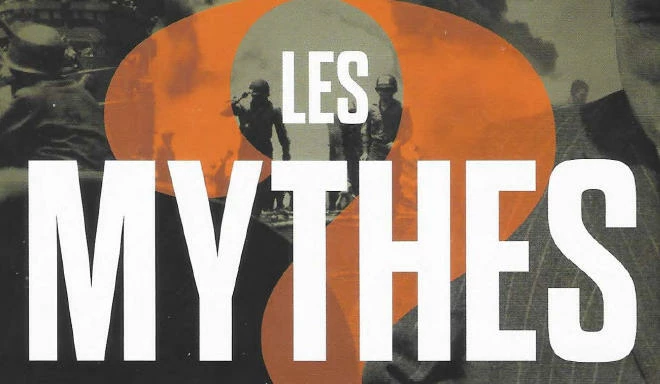



    Correct answer Karl Heinz Kremer

    It may not have enough data to allow you to edit the text - there are not enough different letters in the text. Also, when edit the text, it will not recover the background - because you start with an image where the text covers up parts of an image, these parts are not there. This is different in a PDF file where you first place an image and then place text on top of that image. When you now edit text, it will allow you to see those parts of the image that were covered up by text before. 

    4 replies

    Inspiring
    August 13, 2026

    The file I gave you was only a screenshot (not a scanned image). I thought Acrobat pro could recognize the text from a screenshot, but it is not the case.

    Randy Hagan
    Community Expert
    Community Expert
    August 13, 2026

    Acrobat does recognize the text, but it doesn’t turn pictures of letters into text.


    The text content is saved in kind of a superstructure that layers above the pixel content. Just like the review/markup tools in Acrobat, it doesn’t put that information in the file. It effectively puts that content above the file.


    That’s why you can extract the text recognized by Acrobat in another file format, but you can’t edit the letters appearing in a pixel image. By design, Acrobat doesn’t transform pixels into text; it simply recognizes it and can output it into another file format.


    Hope this helps you understand how this thing works, for better or worse.


    Randy

    Randy Hagan
    Community Expert
    Community Expert
    August 13, 2026

    If there’s not font information in the scanned file, you won’t be able to edit the nonexistent text in the file.


    Though you can edit the text separately using File>Export To>[text format of your choice] menu command in the “old Acrobat” format. All Tools>Export a PDF and choose your text format in the “new” Acrobat layout. Then you can edit the text file independently.


    Hope this helps,


    Randy

    Karl Heinz  Kremer
    Community Expert
    Karl Heinz KremerCommunity ExpertCorrect answer
    Community Expert
    August 13, 2026

    It may not have enough data to allow you to edit the text - there are not enough different letters in the text. Also, when edit the text, it will not recover the background - because you start with an image where the text covers up parts of an image, these parts are not there. This is different in a PDF file where you first place an image and then place text on top of that image. When you now edit text, it will allow you to see those parts of the image that were covered up by text before.