Unable to reach some cells in table using Ctrl Alt Arrow keys
Hi all
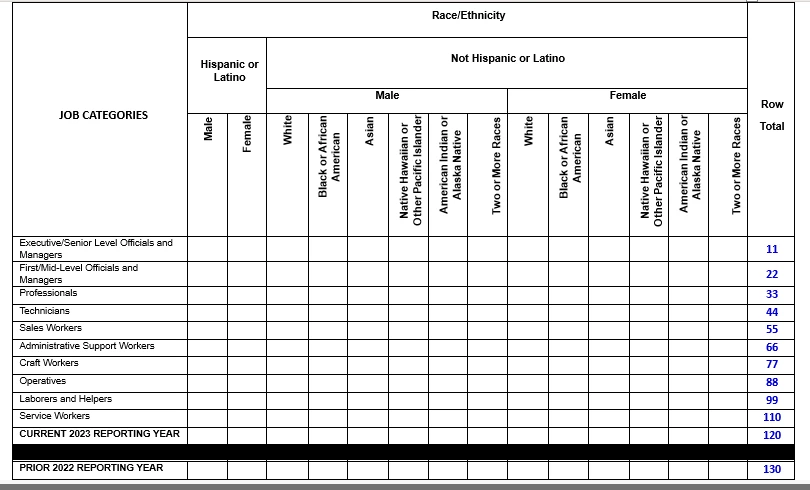
I have a complex table as below in a PDF which needs to be remediated.
I am facing a problem when read out with Screen reader (NVDA).
I have set the scope and ColSpan/RowSpan for different headers here.
For 'ROw total' column header set scope to COlumn and RowSpan to 4.
For 'Race/Ethnicity' set colspan to 14. SImilarly for others
When i am using NVDA to read it i experience the below announcements:
1. Ctrl Alt Arrow keys : I reach 'Row Total' Cell. Then press Ctrl Alt down arrow. It announces as Edge of table, but does not announce the 11 seen in cell below.
I reach 'Race/Ethnicity' cell and press Ctrl Alt right arrow, it announces 'Row Total'. But once i am on cell 'Not Hispanic or Latino' or on 'Female', pressing Ctrl Alt right does not announce 'Row total' but says 'Edge of Table'.
2. DOwn arrow navigation: Once we reach cells 11 or 22 or 33, they are announced as COlumn 17 though there are only 16 columns in table. Cells just before 11 or 22 or 33 are announced as Column 15. Column 16 is not announced in these 3 rows. However cells below 33 i.e 44, 55 and so on are announced as Column 16 and also Ctrl Alt arrow keys work to announce them.
Can some one please let me know what could be going wrong here.
@hammer0909 Could also take a look and let me know what can done to fix the announcement here.
Please let me know if more details are needed from my end.
Thanks
 AdChoices