

Unable to reduce "piece information" in order to reduce PDF size
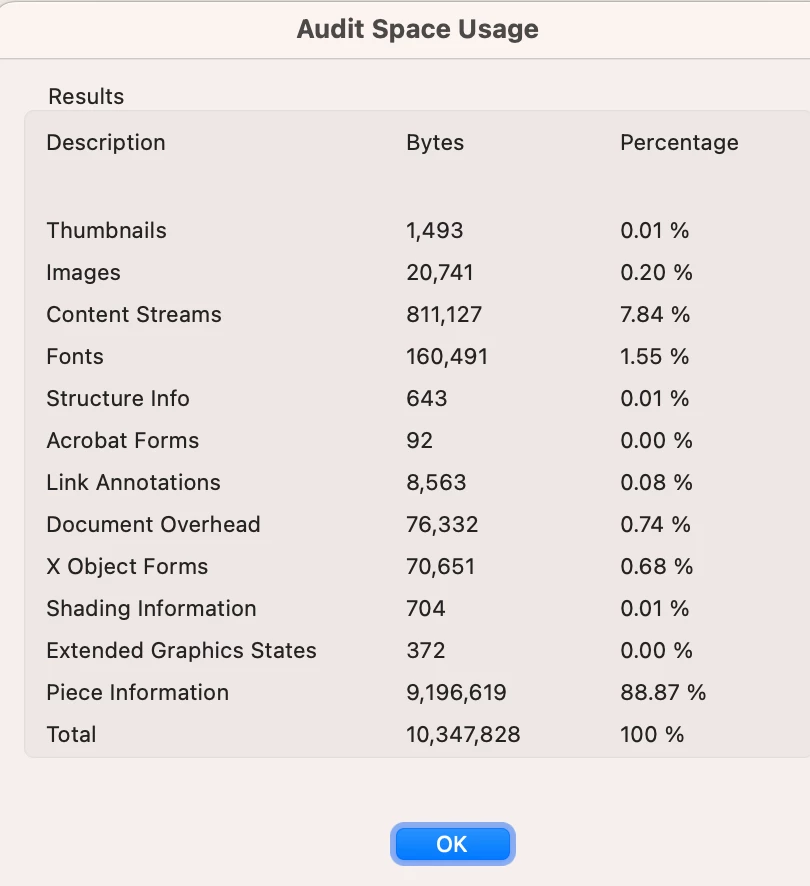
Ok, so I've created a 16 page pdf with vector art, no photos in Illustrator 2024 on a macbook pro, then exported to PDF. I then had to add dozen of hyperlinks in Acrobat (Because Illustrator wouldn't let me create more than one hyperlink in a text box! Really??? Can't believe it.) Somehow this ballooned my file size from 5.6 to 10.3 mb. I've tried reducing file size, optimizing the file, reducing the ppi, but it remains at 10.3mb. My client needs to post this on their website and I need to reduce the file size and retain the hyper links. When I go to the audit space, it shows me that the culprit is "piece information" (see attached screen shot). Is there a way to reduce "piece information". I desperately need to reduce this file size. Please let me know if there's a way.
Thank you in advance for your help.
Diane


 AdChoices