
Unable to "Save As PDF" or convert Word files to PDF
Since (I think) a recent Windows update I have been unable to "Save As PDF" or convert Word files to PDF using the Acrobat tab on the ribbon.
BEFORE this issue I was getting to the point where I could only open one PDF at a time through Windows, otherwise would get the "A running instance of Acrobat has caused an error" error.
I am using:
- Acrobat Version: 22.1.20117.0
- Microsoft® Word for Microsoft 365 MSO (Version 2204 Build 16.0.15128.20240) 32-bit
- Windows 11 Home 22000.675
I have tried uninstalling and reinstalling both programs. I have tried repairing the installations. Everything is up to date. The PDFMOfficeAddin.dll Add-In is loaded and enabled in Word (I have tried removing and re-adding it). Nothing has worked. I can print to PDF but that fails if the document has complicated formating or fonts.
I get one of these two error messages when I try:
Unable to find "Adobe PDF" resource files, OR
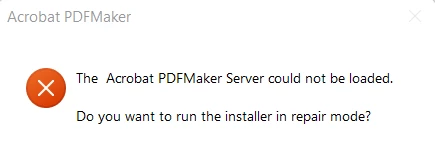
Running the installer in repair mode does nothing.
 AdChoices