
Participant
February 14, 2025
Question

Unable to save Pdf/A

  • February 14, 2025
  • 3 replies
  • 581 views

Hello,

when I try to save in Pdf/A I get this error:
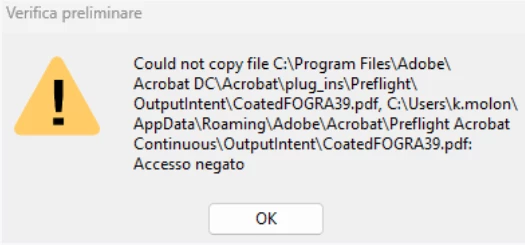
I tried following other directions on this forum but they did not help. Also attempted reinstallation. The problem remains. I ask for a quick and decisive intervention.

Thank you very much in advance,

Marco

3 replies

Adobe Employee
April 1, 2025

Hi @Marco Orlandi ,


Thank you for reporting the issue and apologies for inconvenience caused. 

Save as PDF/A uses the Preflight conversion to save the document to required compliant standard. If you use Preflight Tool (All Tools-->Print Production-->Preflight) , most likely you would see some issues either in profiles loading blank or the issue you reported above. It appears to be some issue with Preflight Profiles getting corrupted or facing issue during install. 


Please try this suggested workaround and let me know if this resolves the issue :


  1. Disable the sandbox feature in Acrobat (under Preferences > Security (Enhanced) > Enable Protected Mode at startup (Preview)) , Quit Acrobat and Restart.
  2. In the case of empty Profiles (or generally), it is advisable to remove the Preflight preferences (%APPDATA%\Adobe\Acrobat\Preflight Acrobat Continuous) to get fresh libraries/profiles after the sandbox is disabled. Quit Acrobat , Remove Profiles from above mentioned path and Restart Acrobat. Try Preflight again after relaunch , it should then fetch the fresh libraries/profiles. Please select all libraries one by one from dropdown to fetch all the profiles (shown in screenshot). It will only take few minutes.


After the profiles have been fetched , then try to use your workflow . Let me know if this resolves your issue.


Note: Please keep a backup of folder before removing from appdata as any custom profiles might get lost during removing/renaming folder.

Once the issue is resolved , please enable sandbox feature again and continue to use Product. 


Regards,

Divya Kumar Singh

JR Boulay
Community Expert
Community Expert
March 10, 2025

Why are you trying to save a PDF file in the Preflight folder?
It would make more sense to save it in your Documents folder.


Acrobate du PDF, InDesigner et Photoshopographe
creative explorer
Community Expert
Community Expert
March 8, 2025

@Marco Orlandi The error message "Accesso negato" (Access Denied) you're encountering when trying to save a PDF/A file in Adobe Acrobat indicates a permissions issue. Specifically, Acrobat is unable to copy the "CoatedFOGRA39.pdf" file from its installation directory to your user's roaming profile due to insufficient permissions. This is likely happening because Acrobat is trying to access a protected system folder and doesn't have the necessary rights to do so.  You can try to Run as adminstrator, or ask your IT Team. Make sure Acrobat is completely closed. Right-click the Acrobat shortcut: Select "Run as administrator." Now, try saving as PDF/A again. Hopefully, this will give Acrobat elevated privileges to access protected system folders and potentially copy the file.

m