


Participant
October 6, 2025
Question

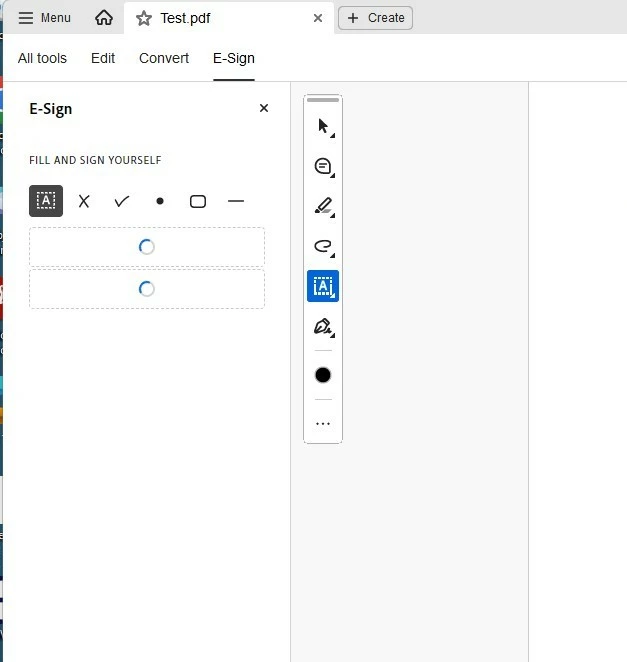
Unable to use E-Sign - screen fails to load

  • October 6, 2025
  • 1 reply
  • 84 views

Hi there.  When I try to use e-sign on Adobe Acrobat signed in with our account, the screen fails to load.  If I log in to the web version, or if I use the same login to log into Adobe Acrobat on another computer in the office it works.  Ive run the Adobe Acrocleaner software, I've uninstalled and reinstalled. I also found a post recommending deleting the DC key in the registry (which I backed up first) but to no avail.  Does anyone know of a solution to this?  Many thanks in advance. 
1 reply

creative explorer
Community Expert
Community Expert
October 8, 2025

@Sophia26579162noyl it's a known, frustrating issue with the Adobe Acrobat desktop application, and since it works on the web and other computers, the problem is most likely local to your specific computer and its configuration.

I would create a new user profile just to confirm it's a corrupt user profile, which contains local settings and data that Adobe Acrobat relies on. When a new profile is created, this corrupted data is bypassed, allowing the application to function correctly. If it works, this confirms your old user profile was the problem. Before you delete the old user profile, just remember to back-up all of the personal files and settings if needed. Deleting a user profile removes all its associated data.

m