Participant
November 29, 2023
Question

Unable to use Globalsign Certificate for certifying a document

  • November 29, 2023
  • 1 reply
  • 306 views

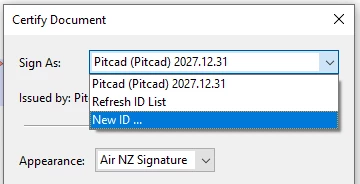
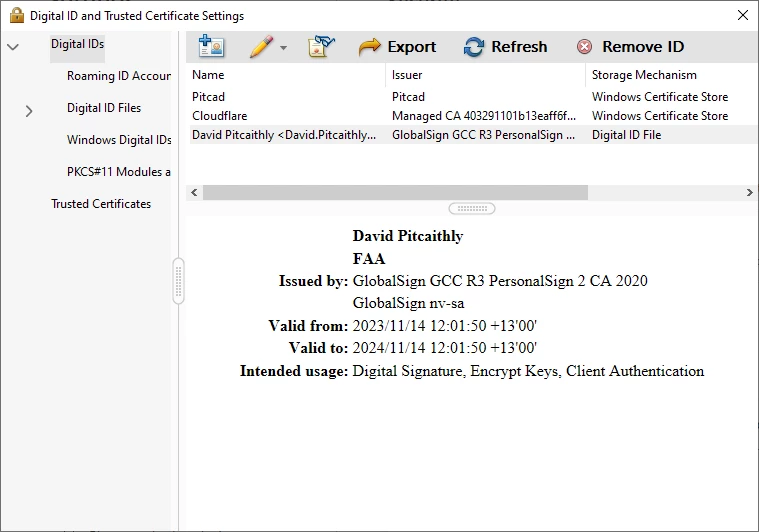
I have been issued a renewed Globalsign certificate which is visible in the Windows Certificate store but when I try to certify a document it is not available for selection. Prior to renewal the previous certificate was available. I'm using Adobe Acrobat Pro 2023.003.20380.

Any ideas on how to fix this?
This topic has been closed for replies.

1 reply

MikelKlink
Participating Frequently
November 29, 2023

The "Intended usage: Digital Signature, Encrypt Keys, Client Authentication" seems to indicate that your certificate has a Key Usage extension with the values Digital Signature and Encrypt Keys and an Extended Key Usage extension with the value Client Authentication.

But that combination is not accepted by Adobe Acrobat for signing. For signing it expects both

  • no Key Usage extension at all or a Key Usage extension with at least one of the values nonRepudiation and digitalSignature, and
  • no Extended Key Usage extension at all or an Extended Key Usage extension with at least one of the values emailProtectioncodeSigninganyExtendedKeyUsage, and 1.2.840.113583.1.1.5 (Adobe Authentic Documents Trust).

See here for reference.

Thus, please ask GlobalSign for a certificate that complies with these requirements.