
Participant
June 30, 2025
Question

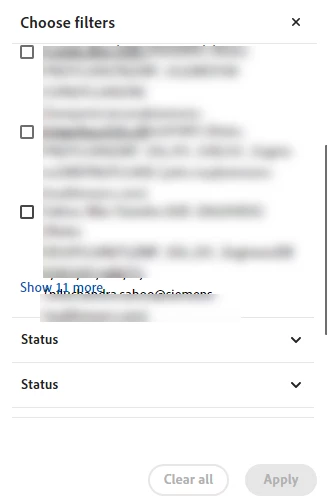
Unable to view all reviewers in Comments filter.

  • June 30, 2025
  • 1 reply
  • 93 views

I am using the Acrobat DC Pro for Shared Review. When there are many reviewers who have provided their comments, the Comment By filter only shows a few names and gives a Show More link. However, the link is getting obscured by a reviewer name and whenever I try to click the link to expand the list of reviewers, the reviewer check box keeps getting selected. Any workaround for this?
 

1 reply

Legend
June 30, 2025

Hi @Gaurav Vartak


Thank you for reporting this issue. And sorry for the troubled experience. 


To help us investigate further, could you please share a screen recording showing the behavior you’re encountering — where some reviewer names are missing from the Comments filter? You can send the video via Private Message to me here on the community to keep your content private. You may upload the video to any cloud drive and share the link. 


Additionally, it would be helpful if you could provide:

  • A sample PDF file (if possible) where the issue occurs

  • Your Acrobat version (e.g., Acrobat Pro 2024.002.xxxx)

  • Your operating system and version (e.g., Windows 11 / macOS 14)


This information will allow us to reproduce the issue more accurately and work with our engineering team to determine the root cause.


Looking forward to your response, and thank you again for your help in improving Acrobat.


~Tariq