


Inspiring
June 19, 2026
Answered

Unable to View Edit Panel and Edit PDFs on Acrobat

  • June 19, 2026
  • 3 replies
  • 158 views

Hi All, 

I have had a few colleagues, including myself who have faced issues with editing a PDF on Acrobat. The Edit panel on the left-hand side has disappeared. We have done a restart, Force close, uninstalled and re-installed the application and still no luck.
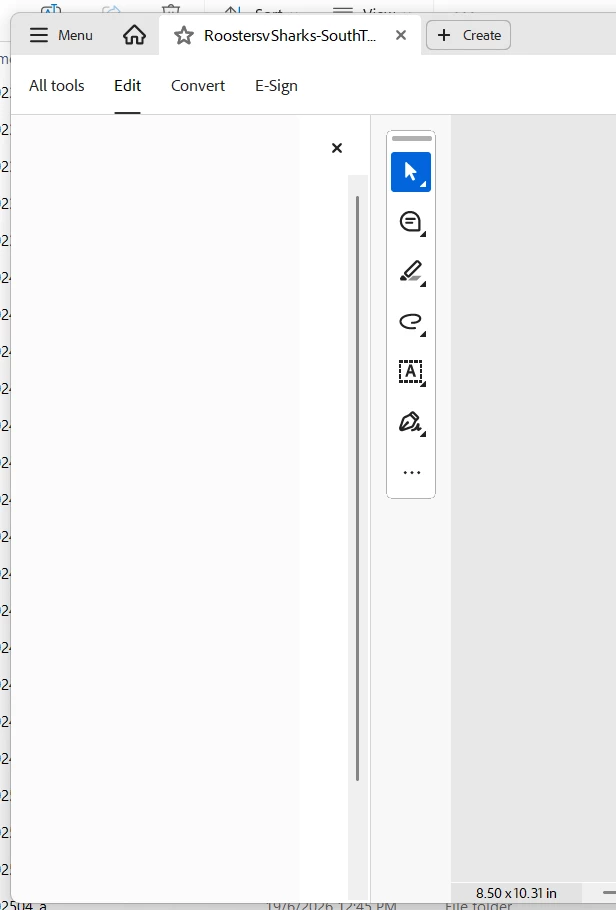
Is this a global outage for Adobe or just a glitch in the system

    Correct answer Anand Sri Bhattacharya

    Hi All,


    Thanks for your patience and cooperation on this.

    The patch is available with the fix 26.001.21691, Planned update, Jun 25, 2026. Please install the latest build of Acrobat from Menu > Help> Check for updates. Restart the machine after installing the updates, and check the performance of the app.


    Let us know if you experience any issues after installing the latest build


    Regards,

    Anand Sri.

    3 replies

    Anand Sri Bhattacharya
    Community Manager
    Community Manager
    June 26, 2026

    Hi All,


    Thanks for your patience and cooperation on this.

    The patch is available with the fix 26.001.21691, Planned update, Jun 25, 2026. Please install the latest build of Acrobat from Menu > Help> Check for updates. Restart the machine after installing the updates, and check the performance of the app.


    Let us know if you experience any issues after installing the latest build


    Regards,

    Anand Sri.

    Anand Sri Bhattacharya
    Community Manager
    Community Manager
    June 25, 2026

    Hello ​@tara_6812 


    I hope you are doing well, and thanks for your cooperation.


    The issue has been fixed from the product side, and there is no change in the app version. Please restart the Acrobat, and the machine once. Check the performance, and let us know if you experience any issues. 


    Regards,

    Anand Sri.

    Community Manager
    June 19, 2026

    Hi ​@tara_6812


    Sorry for the troubled experience, and thanks for reaching out. This isnt a outage, however, a known issue.


    Please try the following suggestions, and let us know if this fixes the issue for you.

    Please note: Create a backup of the registry settings before making any changes. To create a backup, check this article: https://adobe.ly/4vRRJAr


    • Go to the registry location: "Computer\HKEY_LOCAL_MACHINE\SOFTWARE\Policies\Adobe\Adobe Acrobat\DC\FeatureLockDown"

    • Right-click on the right blank space > select New > DWORD 32-bit value.

    • Rename it to:  bGenCoverPagesLabelStrings

    • Right click on the new value > Click Modify > add the value as ‘1’ (numeric one)

    • Restart the Acrobat and the machine and check the performance.


    ~Tariq

    tara_6812Author
    Inspiring
    June 19, 2026


    Community Manager
    June 19, 2026

    @tara_6812 - I don't see any message or anything attached.