


Participant
February 13, 2025
Answered

Unsupported file types - Bug?

  • February 13, 2025
  • 3 replies
  • 417 views

Hi all,


Hopefully some geniuses out there, as I've spent 2 hours with customer support with remote access being helped by 2 different people and they've been unable to resolve the issue.


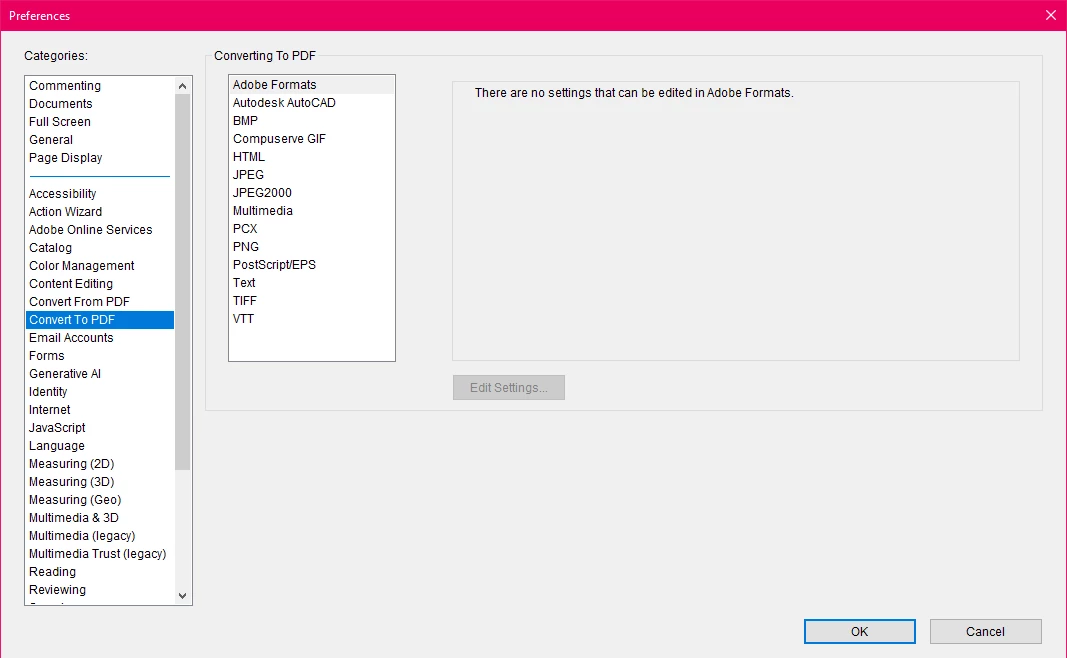
It is my understanding that more file types than this should be supported. If you mouseover 'create a PDF' it even lists word documents as a viable file type. Yet, my Acrobat refuses to do so. I'm aware there are workarounds, and I can still find the file in file explorer etc, right click it and convert it, but I'd still like to know what the issue is with the actual program. To a semi-competent computer person, my only guess is that the program files are missing that are supposed to support those file types, but if it's not that then I haven't got a clue. The whole program has been deleted (every last tiny hidden file) and reinstalled by customer support.


Help.


Correct answer AnandSri

Hello Ryan,


I hope you're doing well, and we apologize for the delayed response and the trouble.


Please ensure you have the latest version of Acrobat installed on the machine: 25.001.20432 Planned update, Mar 11, 2025. Check for any pending updates from the Menu > help > check for updates, install the updates, restart the app and the machine, and check. For more information, see this: https://adobe.ly/3R05hYi.


In addition, please ensure you have all the mandatory or optional updates to the operating system and Office Suite installed. Repair the Office Suite once, reboot the machine, and check. 


If the issue still persists, please use the Acrobat Cleaner tool to remove the installed app, restart the machine and install Acrobat.


Let us know how it goes.

Thanks,

Anand Sri.

3 replies

AnandSri
AnandSriCorrect answer
Legend
March 12, 2025

Hello Ryan,


I hope you're doing well, and we apologize for the delayed response and the trouble.


Please ensure you have the latest version of Acrobat installed on the machine: 25.001.20432 Planned update, Mar 11, 2025. Check for any pending updates from the Menu > help > check for updates, install the updates, restart the app and the machine, and check. For more information, see this: https://adobe.ly/3R05hYi.


In addition, please ensure you have all the mandatory or optional updates to the operating system and Office Suite installed. Repair the Office Suite once, reboot the machine, and check. 


If the issue still persists, please use the Acrobat Cleaner tool to remove the installed app, restart the machine and install Acrobat.


Let us know how it goes.

Thanks,

Anand Sri.

try67
Community Expert
Community Expert
February 13, 2025

What's the exact version number of the application (You can find it out by going to Help - About Adobe Acrobat)?

What's your OS version?

What's your Office version?

Karl Heinz  Kremer
Community Expert
Community Expert
February 13, 2025

I would uninstall all Microsoft Office applications as well and install those from scratch to see if that makes a difference.
