Participant
April 28, 2020
Answered

Unwanted bookmarks when merging pdfs

  • April 28, 2020
  • 3 replies
  • 8202 views

When merging multiple pdfs, Acrobat creates a bookmark with the filename wherever i inserted another document. How can I prevent that?

This topic has been closed for replies.
Correct answer JR Boulay

3 replies

JR Boulay
Community Expert
JR BoulayCommunity ExpertCorrect answer
Community Expert
November 21, 2020

Acrobate du PDF, InDesigner et Photoshopographe
try67
Community Expert
Community Expert
April 28, 2020

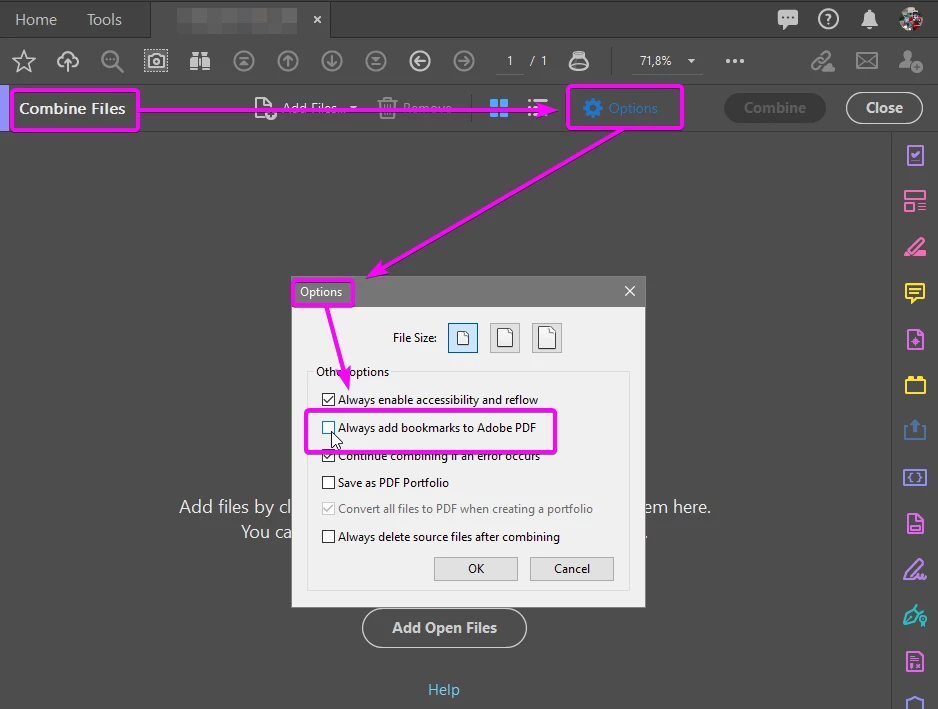
Do you mean "Combine Files into PDF"? If so, you can disable adding bookmarks via the Options button in that dialog, and then un-ticking "Always add bookmarks to Adobe PDF".

OggyAuthor
Participant
April 30, 2020

Yes I mean that tool and I know about the option you're talking about. But if untick it, there's no Bookmarks in the merged PDF at all and I want the bookmarks to be shown. My problem is following:

I have 10-page PDF with cover sheets (lets call it cover.pdf). When I insert another PDF (lets call it chapter.pdf) after one of those cover sheets (e.g. the second one) my index looks like this:


cover.pdf

   title of first coversheet

   title of second coversheet

chapter.pdf

cover (somehow without the .pdf suffix)

   title of third coversheet

   title of fourth coversheet

   and so on...


What I want is an index without multiple entries showing the filename of the cover.pdf (with or without suffix)

I want it to look like this:


title of first coversheet

title of second coversheet

   chapter.pdf

title of third coversheet

title of fourth coversheet

and so on...


I hope you can help me, thx in advance!


Participant
November 20, 2020

Having a similar probelm. Trying to combine multiple pdfs and Adobe just throws the bookmarks into a blender. Missing multiple, changing bookmark names, re-organizing. It's all over the place. Cannot standardize it or change it in a way that will not only preserve the previous booksmarks, but also add new ones for each pdf being added.

JR Boulay
Community Expert
Community Expert
April 28, 2020

There are several ways to merge PDFs, which one do you use?

Acrobate du PDF, InDesigner et Photoshopographe
OggyAuthor
Participant
April 28, 2020

I'm using the merge tool in acrobat pro dc