


Participant
April 17, 2023
Answered

Update changes Acrobat toolbar locations?

  • April 17, 2023
  • 6 replies
  • 26401 views

Has a recent update to Adobe Acrobat changed the layout of the toolbars?


My Custom Toolbar (RED) used to be along the top under the menu bar and my sidebar tools (GREEN) used to be on the left-side that is now occupied by the Custom Toolbar.
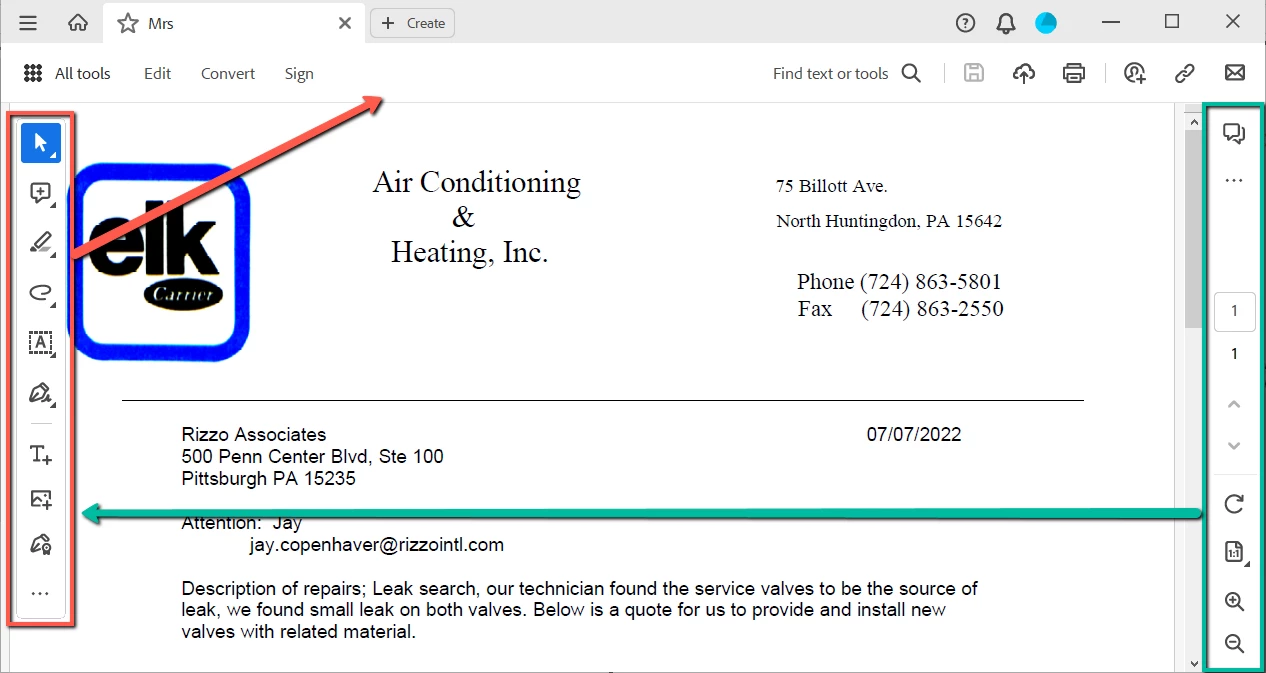
 

I'm not finding anything online about this change or how to change it back. It will no longer allow me to remove the Digital Signature from the Custom Toolbar either.  We always replace that with the Certificate Signature. Having both will be confusing to our users and cause problems if they use the wrong one.

 

Correct answer Meenakshi Negi

Hi defaultujw3m0a00q1b,


Thank you for reaching out.


This is a new Acrobat experience introduced with the recent update. For more information about the new Acrobat experience, please refer to the following help document: https://helpx.adobe.com/acrobat/using/new-acrobat-experience.html.

Let us know if you need any help.


Thanks,

Meenakshi

6 replies

Bobmcc16322665
Participant
May 29, 2025

Just wanted to say how disappointing the new Acrobat Pro is.

I struggle to find some of the specific shortcuts I use and some appear to have gone completely.

Definitely not a fan of the new look Acrobat Pro.

Many thanks on how to “ Disable new Acrobat” that was a blessing.

Meenakshi Negi
Community Manager
Community Manager
May 29, 2025

Hi Bobmcc,


We are sorry to hear about your experience with the new Acrobat.


Could you please share more information on the shortcuts not working in the new version? We will check if the workflow has changed in the new experience and share the information.


If you are referring to the keyboard shortcut, please refer to the information in the following help document to check that: https://adobe.ly/4mC7ojy


You may also share your suggestion/ feedback about the new experience with the product team via the following page: https://adobe.ly/43P8DEC


Feel free to let us know if you need any help.


Thanks,

Meenakshi

Bobmcc16322665
Participant
June 1, 2025

Hi Meenakshi,


I would suspect all the shortcuts are there somewhere, but with a complete new look, and no overhead toolbar I must go searching each time to locate before using and that is wasting too much time.

Now that I have been able to roll back I am able to continue as before.

Spending 95% of my time on a desktop and not a tablet / mobile the previous version is preferred.

Perhaps in the future I will spend time learning the updated layout and reevaluate.

Participant
January 22, 2024

Yes this update moves things around that just don't make sense to me. I've been using Acrobat forever. Just....why? The updates don't even make sense to me. Now I have to figure out how to rearrange everythign to get it back to my normal workflow.  SUPER frustrating.

January 8, 2024

This happened to me, it was defaulting to MS Edge when I opened a pdf file after the update.  Launch the Adobe app and it will ask you to choose your default app when opening files.  Choose Adobe as your new default and you should have restored functionality.   

Participant
November 7, 2023

Hi,
Not sure if you've found the answer but click on the three lines in the top left corner and 'disable new acrobat'.

GL!

Participant
January 19, 2024

Thank you, Thank you, Thank you....


Meenakshi Negi
Community Manager
Meenakshi NegiCommunity ManagerCorrect answer
Community Manager
April 17, 2023

Hi defaultujw3m0a00q1b,


Thank you for reaching out.


This is a new Acrobat experience introduced with the recent update. For more information about the new Acrobat experience, please refer to the following help document: https://helpx.adobe.com/acrobat/using/new-acrobat-experience.html.

Let us know if you need any help.


Thanks,

Meenakshi

Participant
March 28, 2025

THANK YOU THANK YOU THANK YOU!!   WHY IS IT THAT these people think UPGRADE means change everything around.  This isnt Walmart, Im not going to find something else while looking for my favorite items; keep my stuff where Im used to finding it for crying out loud.

kglad
Community Expert
Community Expert
April 17, 2023

in the future, to find the best place to post your message, use the list here, https://community.adobe.com/


p.s. i don't think the adobe website, and forums in particular, are easy to navigate, so don't spend a lot of time searching that forum list. do your best and we'll move the post if it helps you get responses.


<moved from using the community>