



Answered
User signature will not stay saved for signing documents.
We have a user who signs a lot of receipts and other documents.
They usually have their Signature and Initials saved so they can just click the Add Signature button and put their signature directly on receipts and approvals. However, every few documents, the signature completely disappears (seen in screenshot below) and gives the Add Signature prompt again.
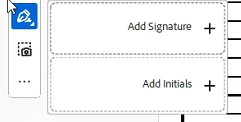
- I have ensured the user has full access to the location of the signature image they upload and the folder where Adobe saves the user's signature.
- I have double-checked that we are clicking ‘Save Signature’ each time we re-upload the signature.
- I have run the “Repair Installation” on Adobe Acrobat
- I have completely uninstalled and reinstalled both Adobe Acrobat and Adobe Creative Cloud
- I have checked Adobe Acrobat for updates (there are none - it is the most up-to-date version of the software)
- I have tried setting the language of the software to ‘same as system’ and back to ‘English’
- I had the user sign out and back into the Adobe products
Are there any ways to troubleshoot this further?

 AdChoices