
Participant
November 28, 2016
Answered

Using Adobe Acrobat Pro XI: Can't find the Preview button

  • November 28, 2016
  • 2 replies
  • 1745 views

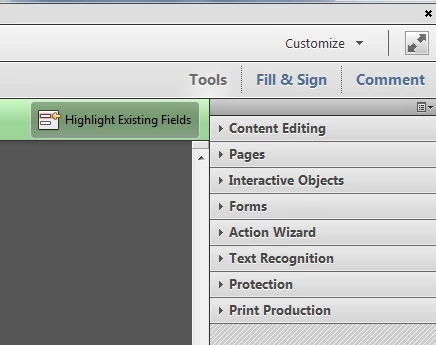
I am using Adobe Acrobat Pro XI at work. I am editing a fillable form. All the instructions say to click on the Preview button at the top right to see if the document will do what you want, but I can't seem to find the Preview button. I have seen it before, so I am probably just blind. This is what my top right looks like:
Help! I am new at this, so have mercy..........thanks!

This topic has been closed for replies.
Correct answer try67

You need to be in Form Edit mode first... Go to Tools - Forms - Edit, and then you'll see it on the left hand side of the toolbar just above the page.

However, the Preview mode is only good for a visual inspection of the file. If you want to test its actual behavior then you should exit the Form Edit mode entirely and test it as a normal file.

2 replies

Participant
November 28, 2016

Thank you so much, for the answer, and for being kind in giving it. This is just what I needed.

try67
Community Expert
try67Community ExpertCorrect answer
Community Expert
November 28, 2016

You need to be in Form Edit mode first... Go to Tools - Forms - Edit, and then you'll see it on the left hand side of the toolbar just above the page.

However, the Preview mode is only good for a visual inspection of the file. If you want to test its actual behavior then you should exit the Form Edit mode entirely and test it as a normal file.