
Participating Frequently
August 10, 2020
Question

Using Month and Year to Auto Fill Week Days with and without Saturdays - that fall in the month

  • August 10, 2020
  • 2 replies
  • 4307 views

Good Day, 


I am working on a pdf that has a month and year section at the top and autofills the weekdays, with and without Saturdays. 

I am sure there is an easier way to do it but I have been able to get it work but can't figure out how get it to leave the field blank if the Date Month does not match the Month field. 


In the Example for march, it lists all weekdays for march but continues to April. I would like it to only list the days in the specified month. 


Any help would be very much appreciated. 
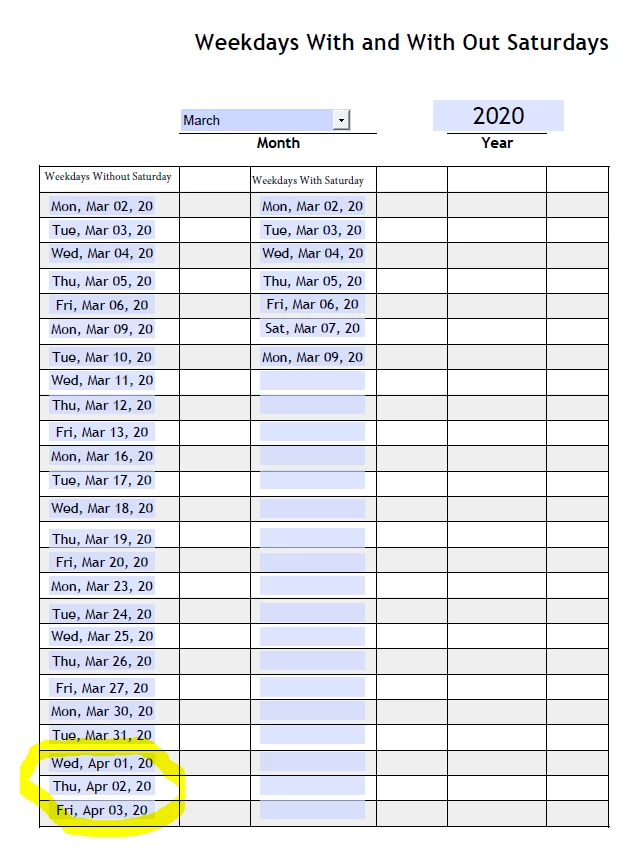
 

I have attached the pdf I have been working on. 


Thank you, 

This topic has been closed for replies.

2 replies

Participant
January 10, 2024

this is exactly what i need

but "why the autofill of days stop working on other text fields" after i changed the format of date on first text field to (dddd) only

need help plz

sorry for my english

try67
Community Expert
Community Expert
January 10, 2024

Without seeing the file and/or the code it's very difficult to say.

Participant
January 11, 2024

I appreciate your hard work

i hope get help in this and sorry for that

, i want  the text field fill (the name of the day only)  beacuse my job required that!.

and it's same file but i will attached (with saturday)

thank  you for your reply and your kind


try67
Community Expert
Community Expert
August 10, 2020

The code under your fields is not the same, so it's a bit difficult to help you with it, but you can use something like this (this is from D25):


var sDate1 = this.getField('D24').value;
var oDate1 = util.scand("ddd, mmm dd, yy", sDate1.toString());
var fDate1 = oDate1.valueOf();
var fMDay = 1000 * 60 * 60 * 24;
// add 7 days to date
var fDate7 = fDate1 + (1 * fMDay);
// convert millisecond for date + 7 days to date time object
var d = new Date(fDate7);

event.value = "";
if(d.getDay()==0){
	d.setDate(d.getDate()+1);
}else if(d.getDay()==6){
	d.setDate(d.getDate()+2);
} else d.setDate(d.getDate())
if (d.getMonth()==oDate1.getMonth())
	event.value = util.printd("ddd, mmm dd, yy", d);


I would highly recommend you use a doc-level function for this, instead of re-writing the code for each one of the fields. It will work much more consistently (for example, clear the Year field and see what happens) and be much easier to edit...


Edit: Code fixed

markbbAuthor
Participating Frequently
August 11, 2020

I tried it but it gives SyntaxError: syntax error 16: at Line 17. 


Thank you for your help. 

try67
Community Expert
Community Expert
August 11, 2020

Copy it again.