
Participant
December 1, 2020
Resuelto

Using part of a form field to auto-fill another form field

  • December 1, 2020
  • 2 respuestas
  • 1090 visualizaciones

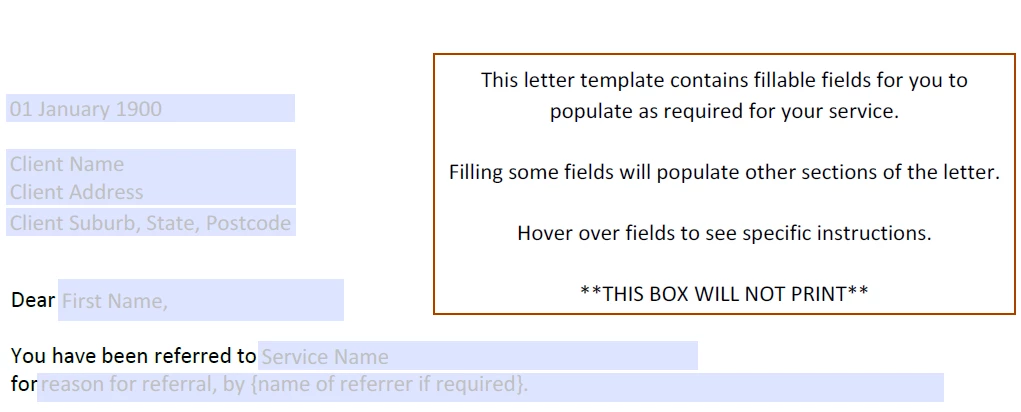
I am using a form to generate a letter. So at the top I want the user to input the client first name and surnanme. Then I want to auto-populate just the firstname into the salutation field. See screenshot below.
 

Este tema ha sido cerrado para respuestas.
Mejor respuesta de Thom Parker

You'll need to script this. Strings can be split a few different ways. This easiest is to use the "string.split()" fucntion.

Put this code in the "Validation" script for the  "Client Name" field.

this.getField("First Name").value = event.value.split(" ")[0];


For this to work, you need to ensure that the name of the field after the word "Dear" exactly matches (verbatim) the name used in the script. 

2 respuestas

try67
Community Expert
Community Expert
December 1, 2020

I would recommend you don't do that. Many people have a name that's more than one word and could be offended if you "cut down" their name to just the first word they enter. Let them enter their own name the way they see fit.

Thom Parker
Community Expert
Thom ParkerCommunity ExpertRespuesta
Community Expert
December 1, 2020

You'll need to script this. Strings can be split a few different ways. This easiest is to use the "string.split()" fucntion.

Put this code in the "Validation" script for the  "Client Name" field.

this.getField("First Name").value = event.value.split(" ")[0];


For this to work, you need to ensure that the name of the field after the word "Dear" exactly matches (verbatim) the name used in the script. 

Thom Parker - Software Developer at PDFScriptingUse the Acrobat JavaScript Reference early and often
Participant
December 1, 2020

Thanks this worked.