Participating Frequently
September 10, 2024
Answered

Validate Required Fields, Email PDF, and Reset Fields on Submit

  • September 10, 2024
  • 1 reply
  • 2426 views

Hi, friends!  I'm new to Acrobat and JS, and have searched the community but can't find quite the answer I'm looking for or can't get the scripts to work together.  


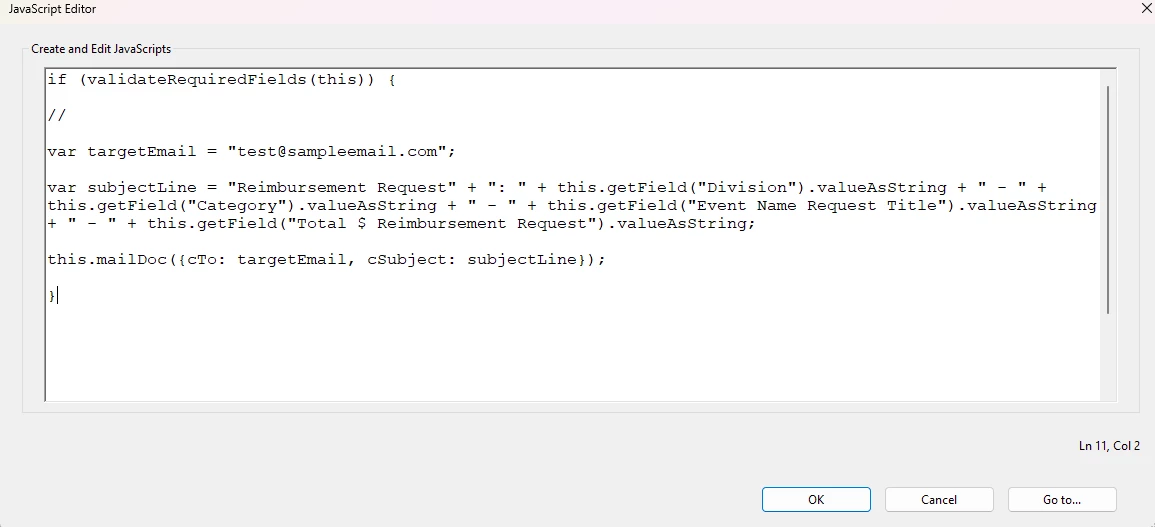
I have a simple form with 7 required fields (5 drop-downs, 2 free text if it matters).  Currently, I have the Submit button coded to validate the required fields and, if complete, send an email.  Script below. The problem is, if the required fields aren't complete, the Submit button does nothing and there's no error message or other indicator of what's missing.


When the Submit button is clicked, I need the following things to happen:

- Validate required fields and generate an error message if any are blank/left on default

- Flatten PDF/make all fields read-only (but data in fields must be copyable)

- Generate an email to the target email address with the flattened PDF attached (currently working)

- Clear all fields on the PDF


Is all this possible?  Any help/sample scripting (please make text I would replace super obvious 🙂 ) appreciated! 


TIA!


This topic has been closed for replies.
Correct answer PDF Automation Station

Required fields are:

- Division

- Name

- Date

- Category

- Total$Requested

-CampaignRelated


var count=0;
if(!this.getField("Division").value)
{app.alert("Division is a mandatory field.",1);count++;} else
if(!this.getField("Name").value)
{app.alert("Name is a mandatory field.",1);count++;} else
if(!this.getField("Date").value)
{app.alert("Date is a mandatory field.",1);count++;} else
if(!this.getField("Category").value)
{app.alert("Category is a mandatory field.",1);count++;} else
if(!this.getField("Total$Requested").value)
{app.alert("Total$Requested is a mandatory field.",1);count++;} else
if(!this.getField("CampaignRelated").value)
{app.alert("CampaignRelated is a mandatory field.",1);count++;}

if(count==0)
{
var targetEmail = "test@sample.com";
var subjectLine = "Reimbursement Request" + ": " + this.getField("Division").valueAsString + " - " + this.getField("Category").valueAsString + " - " + this.getField("Event Name Request Title").valueAsString + " - " + this.getField("Total $ Reimbursement Request").valueAsString;
this.mailDoc({cTo: targetEmail, cSubject: subjectLine});
}


If any of your fields are dropdowns and you used a space for an empty value, change !this.getField("fieldName").value to if(this.getField("fieldName").value ==" " for those fields.  Another thing that is helpful is to add, after each count++; is

this.getField("fieldName").setFocus();

Make sure you change "fieldName" to the actual field names.

1 reply

PDF Automation Station
Community Expert
Community Expert
September 11, 2024

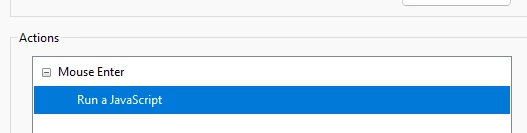
This script should be in a mouse up action, instead of a mouse enter action.  Making fields read only is not flattening them.  You can only flatten them if the end user as Acrobat Pro or Standard.  Reader will not flatten fields.  If you use read only instead, you won't be able to select the text in those fields to copy it.  If you are validating the values of dropdowns, the only way to make one of the selections no value is to use a script.  If you do it manually and make the no value a space, you will have validate for a space.

Please post the script for your function ValidateRequiredFields(this).

tm_tmAuthor
Participating Frequently
September 11, 2024

Thanks!   I changed this to a mouse up action.   Most of our submitters will only have Reader.  My goal with the flatten/read only (I'm sure I'm using the wrong terminology) is to create a copy of what was submitted that can be referenced by both the submitter and the receiving team without having any fields intentionally or inadvertently changed.  Open to the best way to do that.  

My validation doesn't seem to be working so I'm probably missing something here. 


if (validateRequiredFields(this)) {

//

var targetEmail = "test@sample.com";

var subjectLine = "Reimbursement Request" + ": " + this.getField("Division").valueAsString + " - " + this.getField("Category").valueAsString + " - " + this.getField("Event Name Request Title").valueAsString + " - " + this.getField("Total $ Reimbursement Request").valueAsString;

this.mailDoc({cTo: targetEmail, cSubject: subjectLine});

}

tm_tmAuthor
Participating Frequently
September 11, 2024

Clarification: I need the receiving team to be able to copy the data in the PDF fields to a different source but not change the data.