Known Participant
September 28, 2020
Question

Validating Fields while preventing an email to be sent until all required fields are c

  • September 28, 2020
  • 2 replies
  • 1756 views

Hi all-

I was hijacking someone else post and since I was probably being impolite, I thought I better move my post over to a new post. I do want to thank all of those who have helped me so far. 


If anyone want to look at the original post, here it is: https://community.adobe.com/t5/acrobat/validating-fields-in-javascript-while-preventing-an-email-to-be-sent-until-all-required-fields-are/m-p/11443084?page=1#M277505 


I am posting all Javascript in the PDF and I attach the pages of the PDF file to give you an idea of what I am trying to accomplish. I hope I have enough detail in here.


Script to apply "Today's Date". It works.

//<AcroForm>
//<ACRO_source>Today's Date:Calculate</ACRO_source>
//<ACRO_script>
/*********** belongs to: AcroForm:Today's Date:Calculate ***********/
dateToday();
//</ACRO_script>
//</AcroForm>

 Button 2 script

//Validation of the fields;
var emptyFileds - new Array(); //array to hold imcomplete field names;
var oField; // variable to hold field object being tested;
var bProcess = true; // assume all fields completeed;
this.getField("Step 3 - Email will open click the Send email button.").display = display.hidden;
this.getField("Step 4 - Finish").display = display.hidden;
if (oField.valueAsString == oField.defaultValue) {
   oField.strokeColor = color.red;
   emptyFields.push(oField.name);
   bProcess = false;
}
else { oField.strokeColor = color.transparent;
	this.getField("Step 2 - Review your answers then click here to submit form").display = display.visible;
}

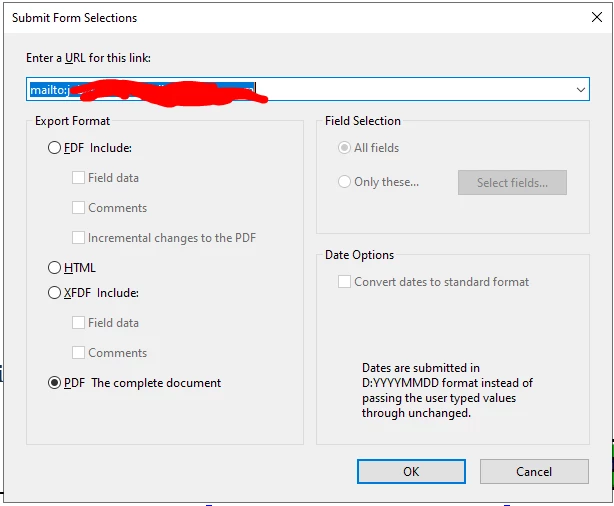
Button 3 - No script, just a "Submit a form" and "Show/hide a field action"


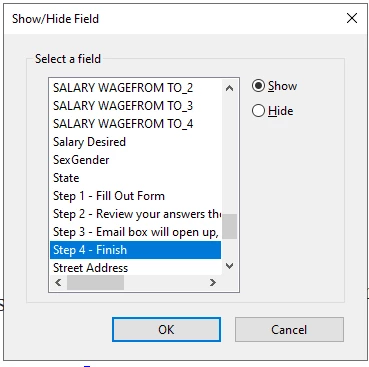
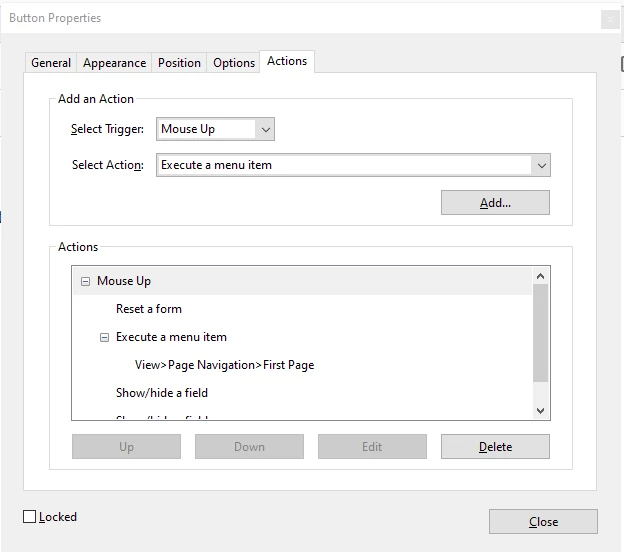
 Step 4 - No script - just a "Reset a form", Execute a menu item - View > Page Navigation > First Page", (2) "Show/Hide a field" actions.


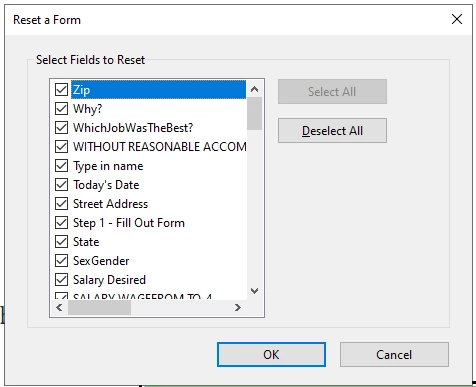
 I reset all fields


Then go to First Page of a 4 page PDF file

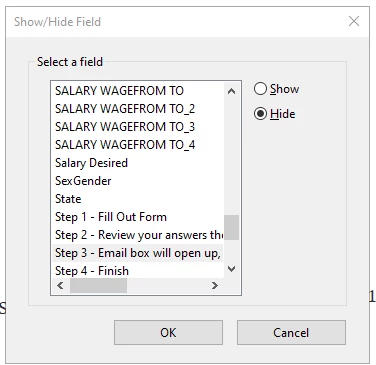
Now Hide Step 3 button


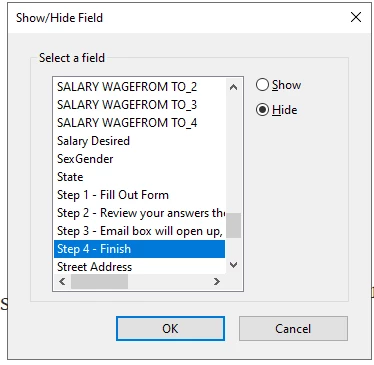
Hide Step 4 button.
End of processing.


This topic has been closed for replies.

2 replies

try67
Community Expert
Community Expert
September 29, 2020

First of all, I moved your question to the Acrobat forum.


You posted a lot of information, but it's not clear what your actual question is...

randyd69Author
Known Participant
September 29, 2020

Sorry, first of all I don't know what happened to the title, it is supposed to say, "Validating Fields while preventing an email to be sent until all required fields are complete".


As I tried to follow the previous forum thread:

https://community.adobe.com/t5/acrobat/validating-fields-in-javascript-while-preventing-an-email-to-be-sent-until-all-required-fields-are/m-p/11443084?page=1#M277505 


I put that code into my "Step 2" button. Got rid of all errors that the debugger showed, but code doesn't do anything. Like I said in previous post, I haven't wrote code since 2008. I am sure I am missing something somewhere. I am not sure what.


Any help would be greatly appreciated.

try67
Community Expert
Community Expert
September 29, 2020

If you want to perform actions conditionally they have to all be done using a script. You can't make other kinds of actions conditional.

randyd69Author
Known Participant
September 28, 2020

Here is what the form look like:

Page 1:It is just a text page with instructions for the applicant.

Page 2: Beginning of Job Application

Page 3:

Last page 4:

This should give you an idea of what I am trying to accomplish.

Here is the new code since original post:

//Validation of the fields;
var emptyFields = new Array(); //array to hold imcomplete field names;
var oField = ""; // variable to hold field object being tested;
var bProcess = true; // assume all fields completeed;
this.getField("Step 3 - Email box will open up, click the Send email button").display = display.hidden;
this.getField("Step 4 - Finish").display = display.hidden;
if (oField.valueAsString == oField.defaultValue) {
   oField.strokeColor = color.red;
   emptyFields.push(oField.name);
   bProcess = false;
}
else { oField.strokeColor = color.transparent;
	this.getField("Step 2 - Review your answers then click here to submit form").display = display.visible;
}