
Value entered does not match the format of the field on PDF Form
I have a form which looks like the below.
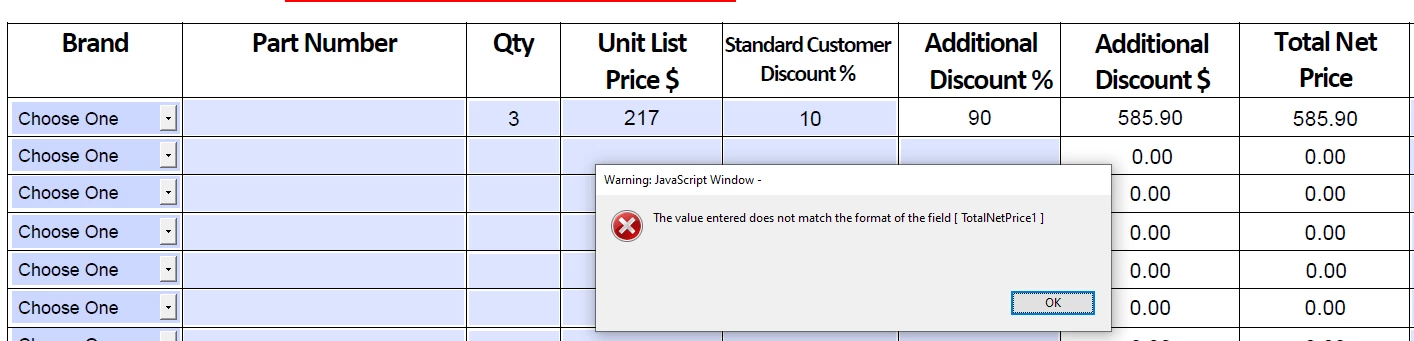
The Additional Discount $ field is calculated like the below and is formatted as a number to 2 decimal places.
( ( UnitListPriceRow1 ) * ( AdditionalDiscountRow1 / 100 ) ) * QtyRow1
The Total Net Price field is calculated like the below and is formatted as a number to 2 decimal places.
( QtyRow1 * UnitListPriceRow1 ) * ( 1 - ( UnitDiscountRow1 / 100 ) ) - AdditionalDiscount1
When I enter 10 into the Standard Customer Discount % field and 90 in the Additional Discount % field to make 100% total discount I receive the error 'Value entered does not match the format of the field on PDF Form' and the calculations don't work. However when I enter 11 into the Standard Customer Discount % field and 89 in the Additional Discount % field to make 100% total discount I receive NO error and the calculations work.
I have no idea how to resolve this or why it is happening, any help would be appreciated.
 AdChoices