
Vector charts exported from InDesign look pixelated in Acrobat (Windows)
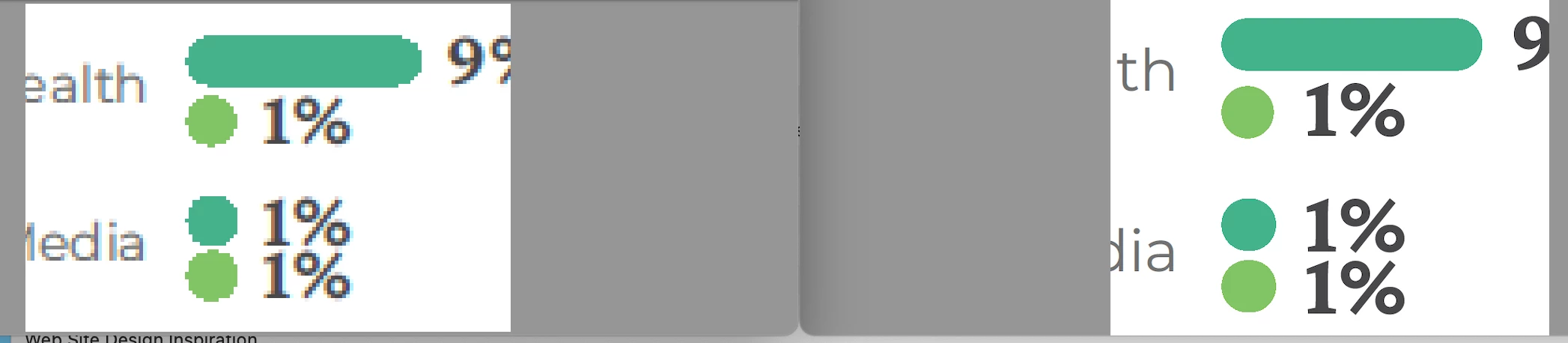
I’m building charts in Illustrator (100% vector, no effects, no transparency, no filters, no spot colors, Im' working in RGB in Illustrator) and placing them into InDesign 20.3.1 on macOS Ventura. I export to Interactive PDF (RGB). On my Mac in Acrobat and in Dropbox’s inline preview, everything is crisp. Two clients on Windows + Acrobat see (apparently) the same charts as pixelated, as if Acrobat is showing a low‑res proxy (similar to InDesign’s “Typical” Display Performance setting). When I import the same PDF into Illustrator, all elements are still vector paths.
We’ve used this workflow for ~8 years without issues; the previous project 2 months ago (earlier InDesign version) was fine. I can't get a sign off on this project until we settle this issue. The only thing that changed is that I updated Adobe apps and I'm slow to update, so I was working with early 2024 versions previously.
Side-by-side screenshots attached show my view vs. theirs at similar zoom levels.
Questions:
Is there a known Acrobat (Windows) display/rendering bug with Interactive PDFs or recent updates?
Any Acrobat settings to check (e.g., Page Display > Rendering, Smooth Line Art/Images, Enhance Thin Lines, GPU)? (I've run into the smooth line art issue before, this also affects the type.)
Can this be something with the new version of InDesign and output settings? I could try going back to a previous version.


 AdChoices