Participant
July 9, 2020
Answered

Viewing Page Display/Zoom Default not working

  • July 9, 2020
  • 2 replies
  • 1362 views

Hi,

On 20.9.20067.384717.

I've read a few post on the forum here to find a fix and none seem to work or applicable.


When I am viewing a large pdf say 1000 pages and there are chapter markers, when I jump between chapters the page view resets to fit or full width view as per the view settings in prefs.

I am trying to keep full page height, and have to manually go back to the menu each time to reset it.

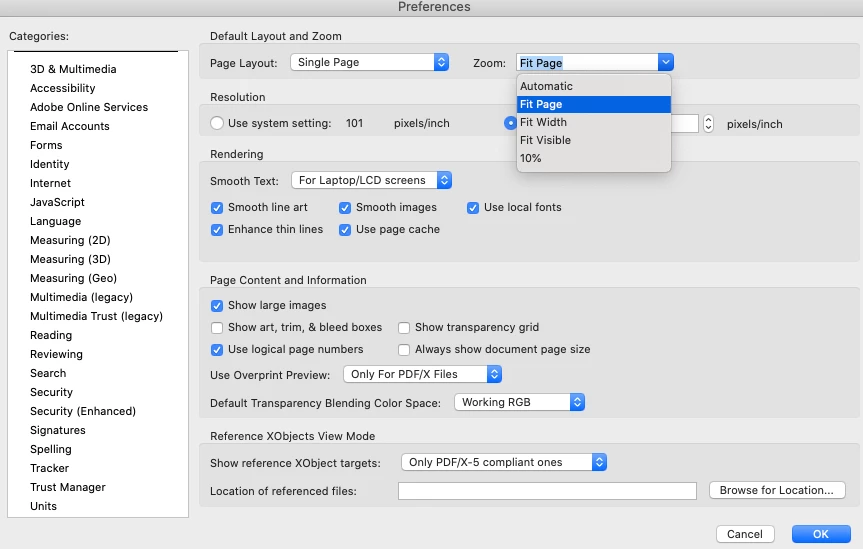
It seems that whatever prefs are set that there is no pref  for full page height so I must manually do it between each chapter jump.

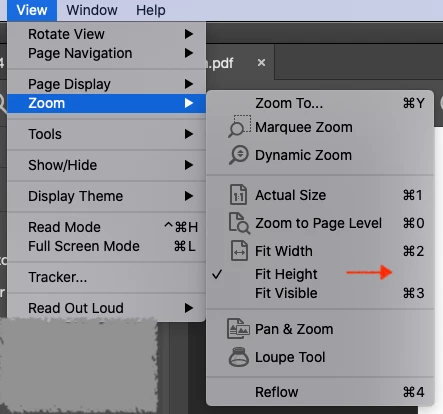
The option for page height strangely is missing a shortcut option in the main menu and I guess is a bug linked to this behaviour.

Thanks. 
This topic has been closed for replies.
Correct answer Dave__M

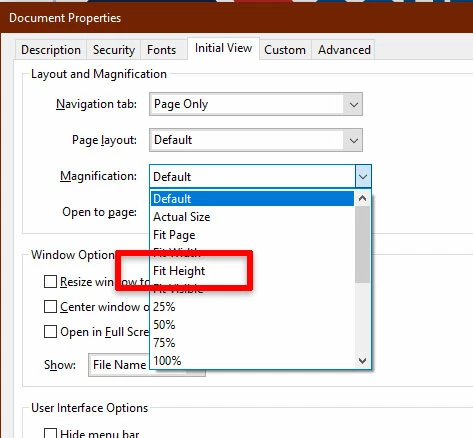
Although it does seem odd that Acrobat does not have a preference for Fit Height, you can set a Document-based setting to do so.  In the Document Properties, on the Initial View tab, it is there.  This will  allow you to, if you wish, and if you have security permission to do so, set a document's initial view to Fit Height.  Once the file is saved, it should always open this way.


I hope this is helpful information.

My best,

Dave


Ah - you may have just uncovered the issue in your last note... are you clicking on Bookmarks (chapters) to navigate your document?  If so, that's  where the issue lies.  A bookmark points to a location, AT A SPECIFIED MAGNIFICATION.  Those bookmarks don't just point to a page - but a page at a zoom level.  One can reset a bookmark's destination by having the appropriate zoom/location showing, right-clicking, and choosing Set destination.  If you have a few, it's easy.  If you have a huge amount... not a quick task.

I hope this is helpful.

Dave

2 replies

Participant
September 24, 2020

When the window is maximized, however, it shows 100% instead of page view or fit height...is there some way to control that??


Document Geek
Community Expert
Community Expert
July 9, 2020

Honestly, this is the first I've ever seen of Fit Height. I think what you may be after is the "Zoom to Page Level" option. Cmd + 0. That fits the entire document in your screen. It should work the same as Fit Height.

MeaoAuthor
Participant
July 9, 2020

Yes...I should have tried the zoom to page level, this does do the same (as far as I can see in this use case), so that's a bit of extra clicking around cut down...


Unfortunately this zoom to page level does not seem to be a pref option for a default view. I'll still need to keep doing this shortcut between chapters till it is made into a default view option, but till then this shortcut is a good stopgap, thanks.


Dave__M
Community Expert
Community Expert
July 9, 2020

Although it does seem odd that Acrobat does not have a preference for Fit Height, you can set a Document-based setting to do so.  In the Document Properties, on the Initial View tab, it is there.  This will  allow you to, if you wish, and if you have security permission to do so, set a document's initial view to Fit Height.  Once the file is saved, it should always open this way.


I hope this is helpful information.

My best,

Dave