Participant
September 19, 2020
Answered

Visible text in PDF is fullcaps/uppercase but the extracted text has random letters in lowercase

  • September 19, 2020
  • 3 replies
  • 5052 views

Hello. I received a PDF from an external source. The PDF contains some test in uppercase.

When I extract this text by copying and pasting it to Word or Notepad, the words that appeared in uppercase in the PDF contain random lowercase letters in Word/Notepad


For example:


Visible in the PDF:

THIS IS A TEST


After copying to Word/Notepate:

ThiS iS A TeST


Does anyone know why this might be happening? Thanks

This topic has been closed for replies.
Correct answer Bevi Chagnon - PubCom.com

It's because some of the text was deliberately typed in all caps in the source document (such typing with the Shift Key pessed down in MS Word), other parts used the Caps/Lowercase icon in the ribbon bar to make it caps.


Capital characters are different glyphs than lowercase letters: see this basic Unicode character chart https://www.unicode.org/charts/PDF/U0000.pdf   Capital A = codepoint 0041, and lowercase a = codepoint 0061.


Some word processing programs retain the originally created CAPS / lowercase letters as they were typed, but change their appearance (not the actual character) with the "case toggle" icon.
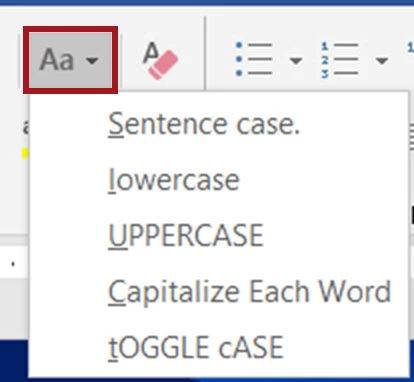
 

When the PDF is exported, it retains the original case and the rendered appearance in the PDF.

And when you later extract the content from the PDF, the original case and appearance is also retained.

In your sample, it's clear that the original author was not consistent in how they typed the actual letters, and that was masked by the case toggle icon, so that all the letters appeared as CAPS, but in reality weren't.


Bottom line: that's how the content was originally typed, and it was carried through all of the file variations.


3 replies

Participant
September 21, 2020

Thank you both for really great answers. I thought my question was unanswerable!

One other thing I have noticed. If I edit the text in the PDF and change the font (I don't do anything else apart from changing the font), the problem goes away (i.e. the text is in all caps when I copy into Word).
Does that extra bit of info change anything in your opinion?

Thanks again for all your help.

gary_sc
Community Expert
Community Expert
September 21, 2020

Yes, that confirms to me that Bevi is correct!

Participant
September 21, 2020

Thank you very much.


Thomas

Bevi Chagnon - PubCom.com
Legend
September 20, 2020

It's because some of the text was deliberately typed in all caps in the source document (such typing with the Shift Key pessed down in MS Word), other parts used the Caps/Lowercase icon in the ribbon bar to make it caps.


Capital characters are different glyphs than lowercase letters: see this basic Unicode character chart https://www.unicode.org/charts/PDF/U0000.pdf   Capital A = codepoint 0041, and lowercase a = codepoint 0061.


Some word processing programs retain the originally created CAPS / lowercase letters as they were typed, but change their appearance (not the actual character) with the "case toggle" icon.


When the PDF is exported, it retains the original case and the rendered appearance in the PDF.

And when you later extract the content from the PDF, the original case and appearance is also retained.

In your sample, it's clear that the original author was not consistent in how they typed the actual letters, and that was masked by the case toggle icon, so that all the letters appeared as CAPS, but in reality weren't.


Bottom line: that's how the content was originally typed, and it was carried through all of the file variations.


|    Bevi Chagnon   |  Designer, Trainer, & Technologist for Accessible Documents ||    PubCom |    Classes & Books for Accessible InDesign, PDFs & MS Office |

gary_sc
Community Expert
Community Expert
September 20, 2020

Hi Thomas,


Yeah, the original came from a printed document that was scanned and then OCRed. Since I/we do not know what the original document looked like we do not know how good of an original document it was, we do not know the resolution it was scanned at, and we do not know the software that generated the PDF or did the OCR.


So, the short answer is I don't know.


If you are exporting the text out you can easily fix the text by using Word's all caps, Title Case, lower case, whatever you need.