Participant
March 3, 2021
Question

Voreinstellungen in Acobe Acrobat 2020 - Einstellung "Dateiname immer als Dokumenttitel"

  • March 3, 2021
  • 2 replies
  • 1844 views

Hallo liebe Community,


von meinem Arbeitgeber wurde mir Adobe Acrobat 2020 auf meinen Laptop installiert.


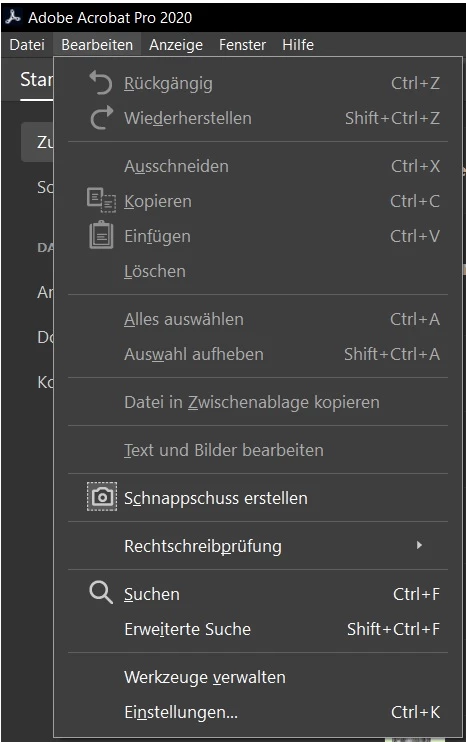
Beim Öffnen von PDFs ist mir aufgefallen, dass in den Tabs nicht der Dateiname, sondern der Dokumentenname angezeigt wird. Dies kann man anscheinend in den Voreinstellungen ändern - allerdings gibt es diese Option "Voreinstellungen" nicht in meinem Adobe Acrobat 2020 (s.u.).


Hat jemand eine Idee, wie ich trotzdem Dateiname als Dokumententitel als Standardeinstellung festlegen kann?


Wäre super, wenn mir da jemand helfen kann.


Lieben Gruß,


Phibi
This topic has been closed for replies.

2 replies

JR Boulay
Community Expert
Community Expert
March 3, 2021

Ce réglage est un paramètre de document (Propriétés : Vue initiale) qui ne peut pas être écrasé par un réglage ou une Préférence du logiciel Acrobat.


Ce que vous pouvez faire c'est utiliser une Action d'Acrobat Pro pour modifier ce paramètre dans tous vos documents.

Acrobate du PDF, InDesigner et Photoshopographe
Bernd Alheit
Community Expert
Community Expert
March 3, 2021

"Ce réglage est un paramètre de document (Propriétés : Vue initiale) qui ne peut pas être écrasé par un réglage ou une Préférence du logiciel Acrobat."


This is not correct.

Bernd Alheit
Community Expert
Community Expert
March 3, 2021

Look at "Einstellungen..."

phibiAuthor
Participant
March 3, 2021

Can't find it at Einstellungen.

There is the possibility to do it one by one for each document (Dokumenteneigenschaften), but I'm looking for a way to set it for all documents with one click, as it saves a lot of time.

Bernd Alheit
Community Expert
Community Expert
March 4, 2021

When you can't see the option update your Acrobat installation.