Inspiring
September 12, 2025
Answered

Vorschau im Druckmenü

  • September 12, 2025
  • 3 replies
  • 153 views

Hi,


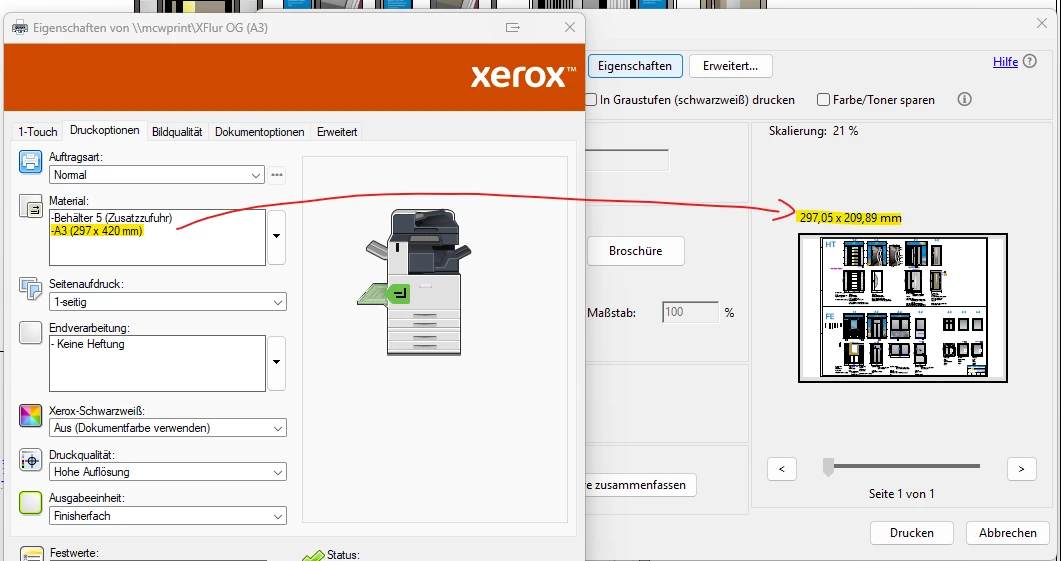
wenn wir eine Datei auf einen A3 Drucker ausdrucken, bleibt Vorschau im Druckmenü auf dem falschen Format stehen. Es wird immer die Größe von A4 angezeigt. Man kann das dann temporär im Menü unter Seite einrichten einstellen, was dann passt. Beim nächsten öffnen der Datei oder einer anderen ist das Menüwieder auf A4 eingestellt.

An was liegt das?


Der Druckertreiber ist ein Xerox GDP PS und der Drucker ein Xerox AltaLink C8130


Correct answer martin_ra

Hallo zusammen,


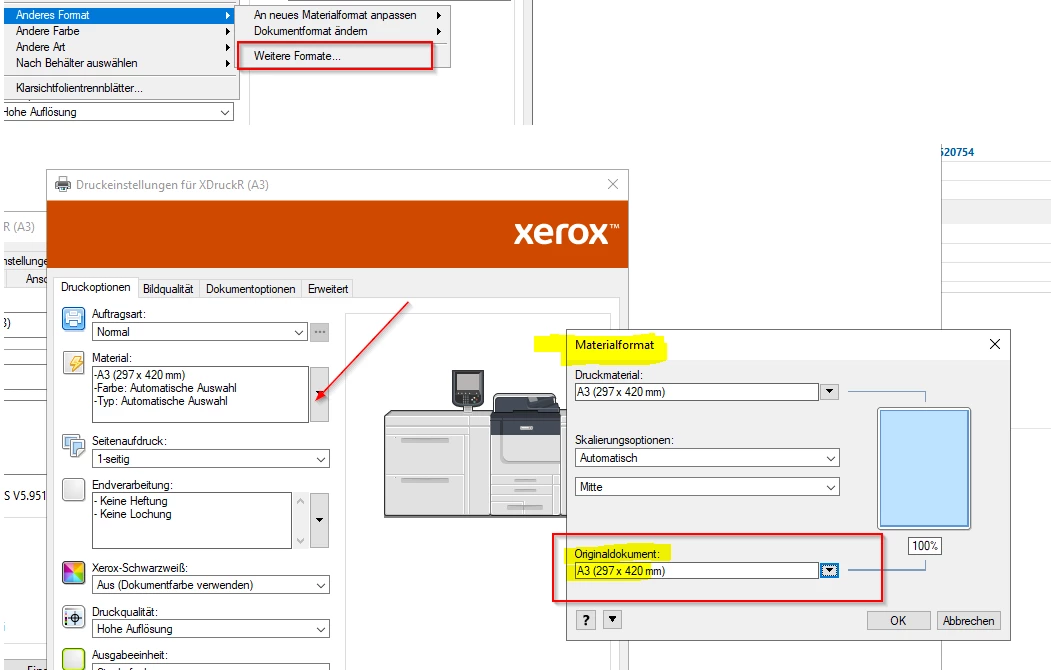
bei Xerox ist es noch etwas komplizierter. Da muss es nicht nur unter den Standard Werten erfasst werden, sondern an der Stelle, damit passt es aber 🙂


Martin


3 replies

radzmar
Community Expert
Community Expert
September 15, 2025

Dem Screenshot zurfolge werden die Eigenschaften eines Netzwerkdruckers angepasst. Die Anpassungen hier sind immer nur temporär. Um eine permanente Einstellung zu bekommen muss man stattdessen die „Standardwerte“ in den Druckereingeschaften und dem Reiter „Erweitert“ anpassen. Das muss in der Regel auf dem Print-Server erfolgen, der den Netzwerkdrucker bereitstellt. 


martin_raAuthorCorrect answer
Inspiring
September 16, 2025

Hallo zusammen,


bei Xerox ist es noch etwas komplizierter. Da muss es nicht nur unter den Standard Werten erfasst werden, sondern an der Stelle, damit passt es aber 🙂


Martin


martin_raAuthor
Inspiring
September 15, 2025

Hi Amal,


thank you for your message. It's a network printer, and I'm the administrator. The default settings point to A3 everywhere. I don't know where else I should enter that. Do you have any other ideas?


Regards,

Martin


Amal.
Legend
September 15, 2025

Hi there 


We are sorry to hear that the issue still exists. Would you mind sharing the version of the Acrobat Application you are using? Go to Help > About Acrobat and try updating it from Help > Check for updates and reboot the computer once. 


Also, check for any pending/missing printer driver updates and try to update them, too. You may also try to remove the printer driver, reboot the computer once, and reinstall it from the printer manufacturer's website and see if that helps.


~Amal

martin_raAuthor
Inspiring
September 15, 2025

Hi,


Version 25.001.20693

The drivers and firmware are up to date. I've also deleted and reinstalled them, but it doesn't work. I'll write to the manufacturer again and let them know.


Martin

Amal.
Legend
September 12, 2025

Hi there 


Hope you are doing well and thanks for reaching out. We are sorry for the trouble you are experiencing. 


When you print from Acrobat, the print preview window always shows A4 because that’s the default paper size set in the Xerox printer driver. Acrobat is just picking up that driver default.


Even though you can switch it to A3 in Page Setup, the next time you print, Acrobat goes back to A4 since the driver is still set that way. Acrobat does remember some settings, but it will always follow the printer driver’s default paper size first.

To fix this, you can:


  • Open the Xerox GDP PS driver settings outside of Acrobat and set the default paper size to A3 (instead of A4).

  • If you’re in a shared print environment, check with IT/admin if the printer queue has A4 locked as the default on the server side.


Also, please check the help page https://adobe.ly/3JSvnfJ and see of that works. 


~Amal