


Ways to fix table structure tags in adobe acrobat
So I’m taking a report created in Microsoft Word and converted to PDF and I’m finalizing it by optimizing it to be fully ADA compliant for WCAG 2.1 AA. I’m having trouble though with the table tags as it’s throwing inconsistency errors. Usually this is something simple like one cell spans multiple columns and I just have to go in an manually say the cell spans 3 columns or such. However one table for whatever reason I can’t figure out doesn’t render anywhere near the correct fashion during the conversion to pdf. In the past I would delete the converted tag and just reedited it as a table and it works on the second time. Something about this table though it just doesn't work it combines all the header row into one and for the life of me I can’t find a way to manually tag the table as the auto function can’t understand it.
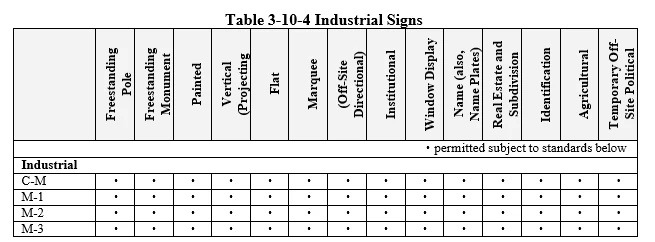
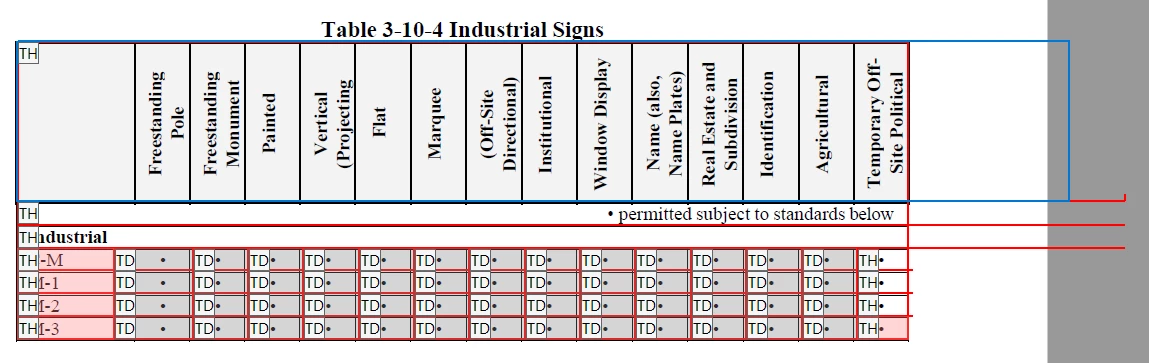
As you can see it’s treating the entire top row as one cell and for some reason things there is more to the table structure off the side of the page despite the fact that the table is set to 6.5 inches wide.
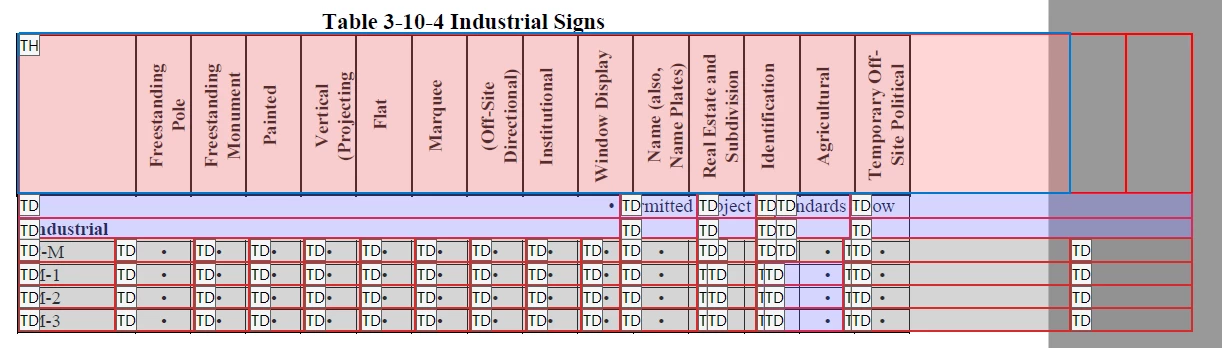
Lastly if I try to remove just the table structure it won’t let me retag the table at all. I highlight the table it doesn’t give me the option on the Reading Order to tag the highlighted section. Instead I have to clear the entire page structure so that I can retag just the table and when I do it does figure where again it things all the table headers are one big cell and now shows two more to the right again off page and outside the boundaries.
Any insight anyone can offer to help me be able to correctly tag this so it can be ada compliant is greatly appreciated.
 AdChoices