
Participant
June 13, 2024
Question

Web Form popup blocks screen on mobile

  • June 13, 2024
  • 2 replies
  • 346 views

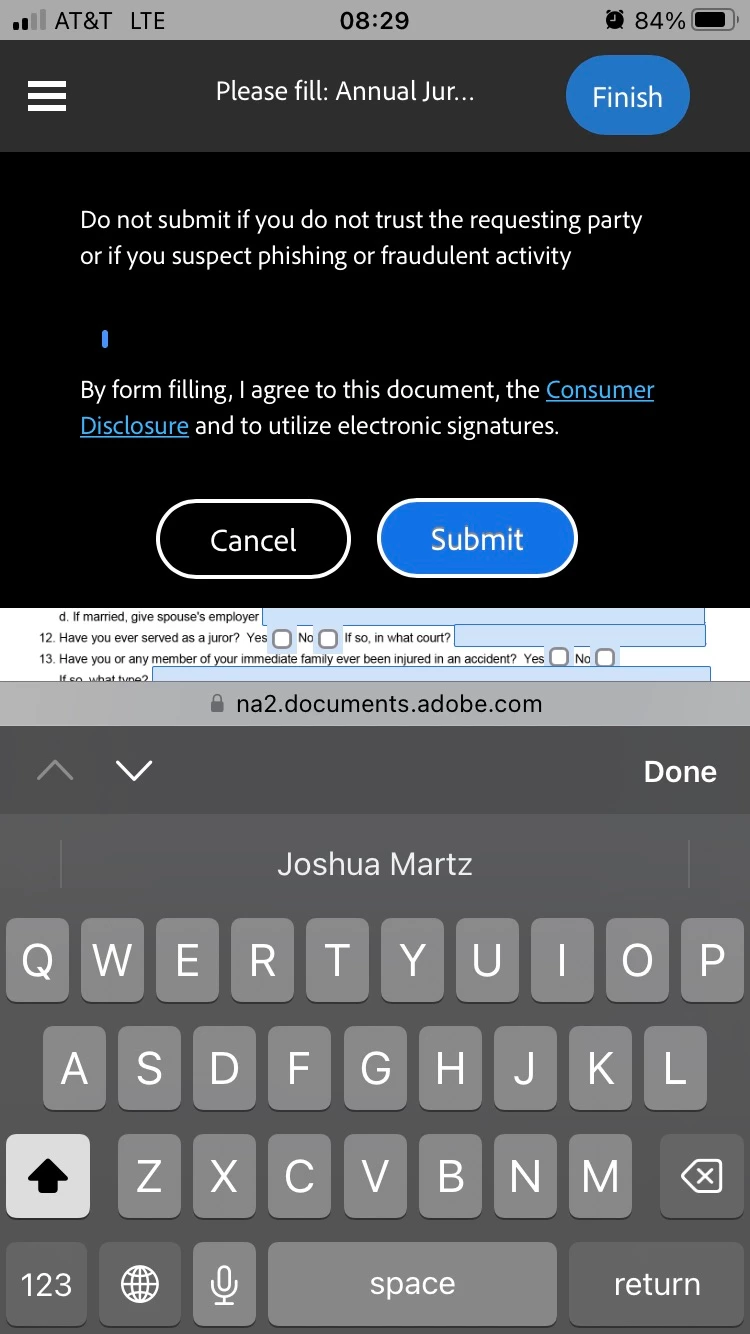
This is ridiculous. When we send out a form for users to fill out, if they try to fill it out on mobile, every time they click on a field to fill in, the submit pop-up fills up 40% of the screen, with the keyboard also filling up another 40% of the screen. Why does that pop-up happen EVERY TIME you click a field? If you click a field near the top of the page you can't even see what you're typing!
 

This topic has been closed for replies.

2 replies

Meenakshi Negi
Community Manager
Community Manager
August 2, 2024

Hi Josh3588113728gz and tlow7,


Thank you for reaching out, and sorry about the trouble caused.


As you are signing a document on a mobile device, please confirm if you are using the browser to fill out the form or the Acrobat Sign mobile application. Please share the following information for further investigate this behavior:

- Do you experience the same behavior when using the desktop to fill out the form? 

- Did you check if the behavior occurs with every document you try to sign?

- If using the mobile application, share the Acrobat Sign and OS version on the device. 


Thanks,

Meenakshi

tlow7
Participant
July 20, 2024

I have the same issue and can not find a fix its so annoying!! Did you find out a fix for this yet?