Participant
February 19, 2024
Answered

Weight Calculations

  • February 19, 2024
  • 1 reply
  • 852 views

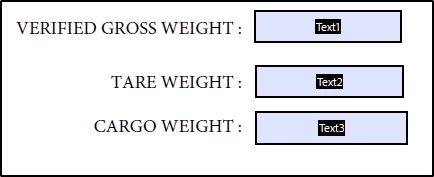
Hello...I just would like to ask for your help regarding a weight calculation with verification and app.alert

Text1 - Text2 = Text3

if Text3 is between 28000kgs to 30000kgs the "Fee is applied"

if Text3  is more than 30000kgs its "Overweight"


This topic has been closed for replies.
Correct answer Nesa Nurani

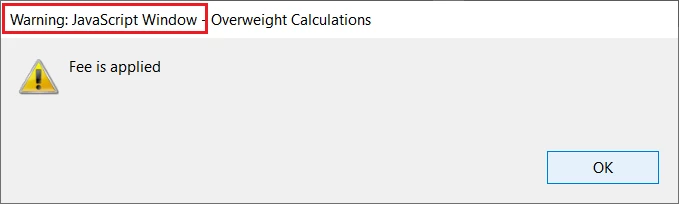
Use this alert:

app.alert({
 cMsg: "Fee is applied",
 cTitle: "Overweight Calculations",
 nIcon: 1
});

This will still show 'Warning' message, to get rid of that you would have to create folder level script on your local machine (which would then only works on your PC).

1 reply

Nesa Nurani
Community Expert
Community Expert
February 19, 2024

For calculation in "Text3" field under 'Calculate' tab select 'Simplified Field notations' and enter: Text1-Text2.
For alert in the same field under 'Validate' tab select 'Run custom vaidation script' and enter this:
if(Number(this.getField("Text1").valueAsString) > 0 && Number(this.getField("Text2").valueAsString) > 0){
if(Number(event.value) > 28000 && Number(event.value) <= 30000)
app.alert("Fee is applied");
else if(Number(event.value) > 30000)
app.alert("Overweight");}

SandLynxAuthor
Participant
February 28, 2024

Hi Nesa...Thank you very much. This works. Just a few enhancement to the alert window. Would you be able to assist to change the following? Thank you. : )


Nesa Nurani
Community Expert
Nesa NuraniCommunity ExpertCorrect answer
Community Expert
February 28, 2024

Use this alert:

app.alert({
 cMsg: "Fee is applied",
 cTitle: "Overweight Calculations",
 nIcon: 1
});

This will still show 'Warning' message, to get rid of that you would have to create folder level script on your local machine (which would then only works on your PC).