
Participating Frequently
October 9, 2023
Question

Weird characters after compressing

  • October 9, 2023
  • 2 replies
  • 593 views

PDF created from InDesign and uploaded for compression here - https://acrobat.adobe.com/link/acrobat/compress-pdf?x_api_client_id=adobe_com&x_api_client_location=compress_pdf


Compresses fine and looks okay when result is viewed online but when I download the file one of the fonts (Helvetica Neue) looks like this throughout the file (whether reversed out or not):
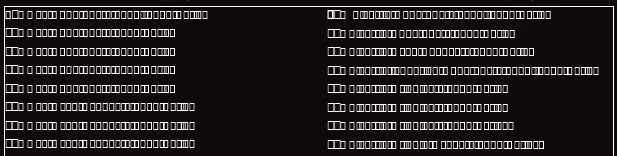


Using Acrobat Pro as part of CS Suite


Any ideas?

This topic has been closed for replies.

2 replies

Participant
October 11, 2023

I have a similar problem but with printing. I use Helvetica regular. I made an export to PDF from Indesign and optimized it in Acrobat Pro. We never had problems with this way of working. Can it be the new Adobe Acrobat update?


Abambo
Community Expert
Community Expert
October 9, 2023

The embedded font does not get taken over by the compress operation. Why don't you optimize the output from InDesign? You can modify the export parameters to your liking. That would be a better approach.

ABAMBO | Hard- and Software Engineer | Photographer