Weird Issue with Adobe Acrobat 9, X, XI Adobe PDF Printer with Windows 10
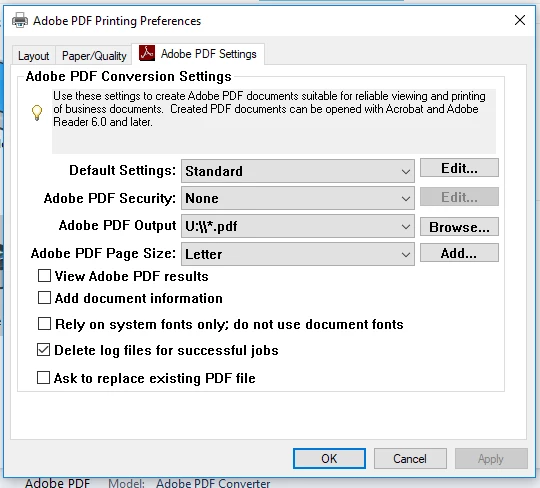
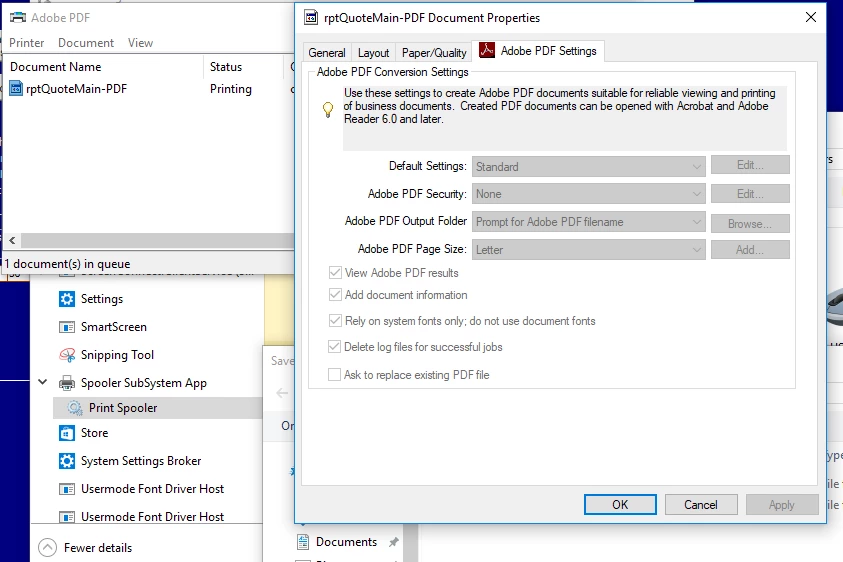
At my workplace we have a database that runs in Access Runtime 2007. In the program there is an area that prints a form to a pdf. On Windows 7 and 10 we have the Adobe PDF printer setup to not view the pdf after creation and to save to a default location instead of prompting for a filename. On Windows 7 this works fine and we have no issue, but on Windows 10 the Printer Preferences and Printer Defaults are set to the above settings. However when the Access Runtime creates the pdf, we are prompted for a save location and the pdf is opened after creation. I have some pictures on the issue. I have now found that when I go to the printer queue for the Adobe PDF printer in Windows 10, the document properties show that the options to prompt for filename/save location and view pdf after creation. Please let me know if anything is not clear.
 AdChoices