Participant
February 18, 2025
Question

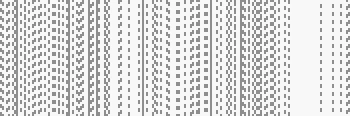
Weired grey dotted line in Adobe Acrobat
  • February 18, 2025
  • 1 reply
  • 202 views

When I edit pdf, these lines just full of screen and I can't edit my pdf. How can I turn it off?

1 reply

Amal.
Legend
February 18, 2025


Hi there,

Hope you're doing well! Thanks for reaching out.

Could you please let us know if this issue happens with just one specific PDF file or with all PDFs you try to edit? If possible, try editing a different PDF and see if the issue persists.

Additionally, could you share the exact steps you're following to edit the PDF? If you can, a short video recording of the issue would be really helpful in understanding the problem better.

Also, please check the version of Acrobat Pro and your operating system (OS). To find your Acrobat Pro version, go to Help > About Acrobat. Ensure that it's updated to the latest version 24.05.20414 by going to Help > Check for updates. Once updated, restart your computer and see if the issue is resolved.


Additionaly for future reference and self-help please check the help page https://helpx.adobe.com/acrobat/faq.html