


Participant
December 27, 2024
Answered

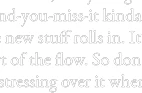
What causes this halo effect when combining?

  • December 27, 2024
  • 1 reply
  • 328 views

Hello I need to know what causes this to happen in Acrobat. I am combining a ton of PDF's none of them are made like this but once they are combined this happens randomly across the whole document. 


Correct answer Oh.N8

Hey @SteveGOriginal 

There could be a number of reasons. 

When combining PDFs, a "halo effect" (often manifesting as corrupted text or images) can occur due to non-standard fonts not being embedded or issues with font consolidation during the merging process. 
 
Here's a more detailed explanation:
  • Non-Embedded Fonts:
    If the original PDFs contain fonts that are not standard (like custom fonts) and are not embedded within the PDF file, the combined PDF might display garbled or missing text because the viewer doesn't have access to those specific fonts. 
     
  • Font Consolidation Issues:
    When combining PDFs, the software attempts to consolidate fonts, but sometimes this process can fail, especially if the original PDFs have conflicting or incompatible font settings. 
     
  • Printing Issues:
    Printing a PDF that has a halo effect can cause the printed image to be surrounded with an undesired line encircling the dot 
     
  • Troubleshooting:
    • Embed Fonts: Ensure that all fonts are embedded in the original PDFs before combining them. 
       
    • Use PDF/X-1a: Save the original PDFs as PDF/X-1a before combining them. 
       
    • Optimize PDFs: Save PDFs as optimized PDFs before combining them. 
       
    • Check for Updates: Ensure you have the latest updates for your PDF software. 
       
    • Clear Browser Cache: If viewing the PDF online, clearing your browser cache can resolve display issues. 
       
    • Convert to Image Format: If all else fails, you can convert the PDF to an image format (like JPG or PNG) and then combine the images. 

1 reply

Oh.N8Community ExpertCorrect answer
April 8, 2025

Hey @SteveGOriginal 

There could be a number of reasons. 

When combining PDFs, a "halo effect" (often manifesting as corrupted text or images) can occur due to non-standard fonts not being embedded or issues with font consolidation during the merging process. 
 
Here's a more detailed explanation:
  • Non-Embedded Fonts:
    If the original PDFs contain fonts that are not standard (like custom fonts) and are not embedded within the PDF file, the combined PDF might display garbled or missing text because the viewer doesn't have access to those specific fonts. 
     
  • Font Consolidation Issues:
    When combining PDFs, the software attempts to consolidate fonts, but sometimes this process can fail, especially if the original PDFs have conflicting or incompatible font settings. 
     
  • Printing Issues:
    Printing a PDF that has a halo effect can cause the printed image to be surrounded with an undesired line encircling the dot 
     
  • Troubleshooting:
    • Embed Fonts: Ensure that all fonts are embedded in the original PDFs before combining them. 
       
    • Use PDF/X-1a: Save the original PDFs as PDF/X-1a before combining them. 
       
    • Optimize PDFs: Save PDFs as optimized PDFs before combining them. 
       
    • Check for Updates: Ensure you have the latest updates for your PDF software. 
       
    • Clear Browser Cache: If viewing the PDF online, clearing your browser cache can resolve display issues. 
       
    • Convert to Image Format: If all else fails, you can convert the PDF to an image format (like JPG or PNG) and then combine the images.
