


Participant
February 4, 2025
Answered

What version is this interface?

  • February 4, 2025
  • 2 replies
  • 267 views

Hey Guys! Anybody knows how to get this interface? I need to have the text indicators for underlines and strikethroughs. I have that interface in my PC, but when I installed the same version in my laptop, the interface was different, and it does not display the indicators for underlines and strikethroughs. Please help. Thanks.
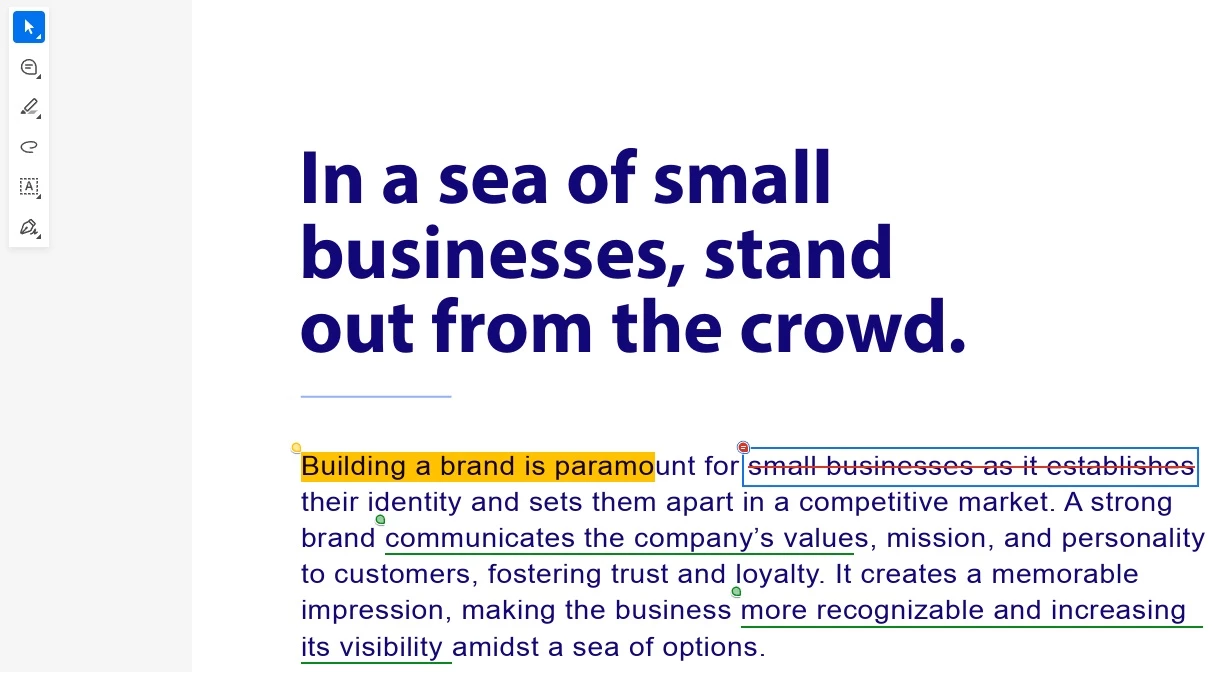

Correct answer AnandSri

Hello!


I hope you're doing well, and we apologize for the delayed response and the trouble.


As correctly highlighted by our Product Community Expert, please ensure you are on the latest version of Acrobat. Check for any pending updates from the Menu > help > check for updates, install the updates, restart the app and the machine, and check. For more information, see this: https://adobe.ly/4bqeqmx.


If you don't see the new UI, Click on the View Menu > Select Enable New Acrobat. See the screenshot. To learn more about it, please refer to this article: https://adobe.ly/4klKqfD


Thanks,

Anand Sri.

2 replies

AnandSri
AnandSriCorrect answer
Legend
March 6, 2025

Hello!


I hope you're doing well, and we apologize for the delayed response and the trouble.


As correctly highlighted by our Product Community Expert, please ensure you are on the latest version of Acrobat. Check for any pending updates from the Menu > help > check for updates, install the updates, restart the app and the machine, and check. For more information, see this: https://adobe.ly/4bqeqmx.


If you don't see the new UI, Click on the View Menu > Select Enable New Acrobat. See the screenshot. To learn more about it, please refer to this article: https://adobe.ly/4klKqfD


Thanks,

Anand Sri.

try67
Community Expert
Community Expert
February 4, 2025

Make sure you have the latest version of the application. If you still don't see it, go to the View menu and select "Enable New Acrobat" or something like that. If that option doesn't appear there, you're using a too-old version of the app, which doesn't have this new UI.