Participant
July 3, 2026
Answered

When a PDF is e-signed and saved using the "Save a Certified Copy" option, where is the file located?

  • July 3, 2026
  • 1 reply
  • 55 views

When one selects E-sign from the top menu in acrobat it provides options to file, sign and save a document. When the option to “save a certified copy” is selected Acrobat generates a copy of the document. However, that document does not get saved locally, it generates the document and provides a link to save it locally. Respectfully, WTF Adobe. I did not ask you to take possession of my personal documents. Now I am trying to figure out how to delete these documents from adobe servers, but they are not showing up in my files in cloud storage. I can see them as recent documents in acrobat and online at https://acrobat.adobe.com/link/home, but there is no option to delete them. Again, WTF. I think it’s time to start air-gapping my machines every time I need to open a personal document with an Adobe product.

    Correct answer Meenakshi0101

    Hi aaron sportack,


    If you are using the "Save a certified copy" option, please note that it will be saved to the Acrobat Sign server, and there is no way to prevent this. Additionally, the document will not be stored in your Adobe web account; however, you can access it through the "All Agreements" folder in your Acrobat web account.


    If you wish to remove the document from the server, please use the steps as suggested here:


    1. Open the link: https://acrobat.adobe.com/link/home/

    2. Sign in using the Adobe ID and password.

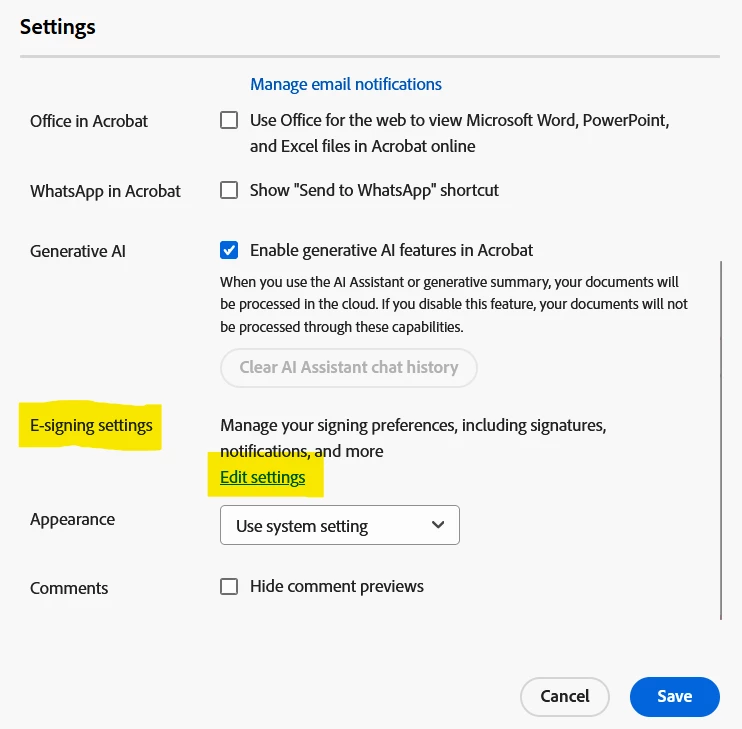
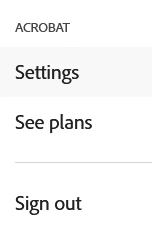
    3. Then click on the Profile icon and select Settings.


    4. Go to E-signature settings and click on Edit settings.


    5. Go to the Privacy tab and search the document using the email address used in the transaction. As you have only saved the copy, you can use your email address to search it.


    Let us know how it goes.


    Thanks,

    Meenakshi

    1 reply

    Meenakshi0101
    Community Manager
    Community Manager
    July 3, 2026

    Hi aaron sportack,


    Thank you for reaching out, and sorry for the trouble caused.


    When you select the “save a certified copy” option, it creates a certified copy and saves it on the Acrobat Sign server, where all Acrobat Sign documents are stored. You can check the document under the Acrobat Sign folders in the application or web account.

    You may also refer to the information here: Share certified copies of PDF forms


    Let us know if you have any questions or need help.


    Thanks,

    Meenakshi

    Participant
    July 4, 2026

    Yes, the question is how do I delete these documents from Adobe servers and how to I prevent them from getting saved online in the future.

    MikelKlink
    Participating Frequently
    July 4, 2026

     how to I prevent them from getting saved online in the future.

    If you don't want your documents to go online, don't send them to an online service. 

    The "save certified copy" function you executed uses the Acrobat Sign online service. 

    If you want to certify documents (I.e. apply an author signature to them), you can do so using the Certificates tool. You will of course need to have a locally installed keypair for that.