


Participant
April 2, 2025
Answered

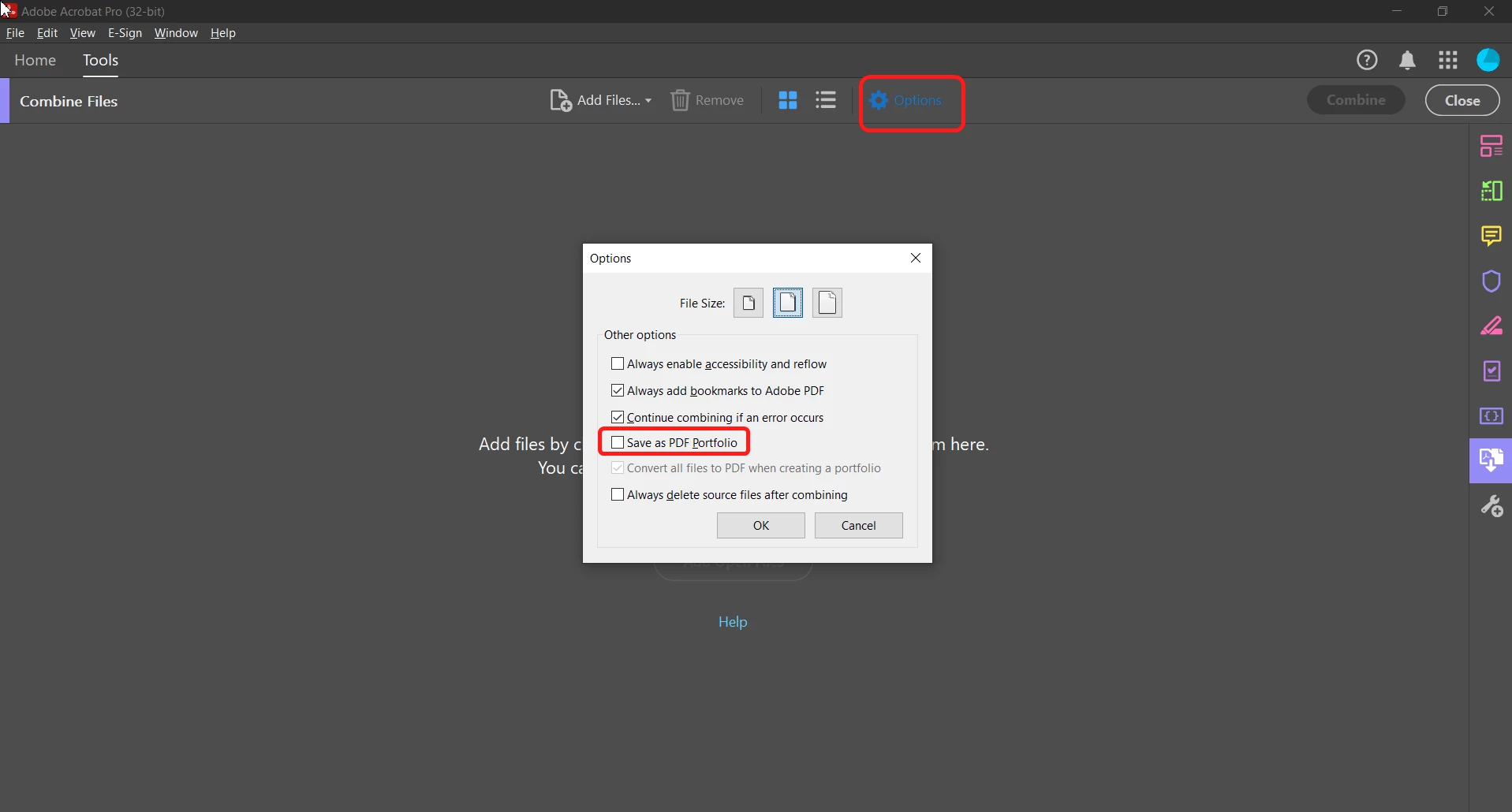
When combining files into one PDF, the program automatically combines to a portfolio.

  • April 2, 2025
  • 1 reply
  • 539 views

I recently combined to documents into a portfolio, which was fine. Now I want to combine two other documents into one document (I do this all the time) and the program defaults to a portfolio, despite what I select on the menu. How do I get it back to just combining the documents?

Correct answer try67

You can change it manually via the Options dialog of the Combine Files command:


Make sure that box is NOT ticked.

1 reply

try67
Community Expert
Community Expert
April 2, 2025

This will happen if the files can't be combined to a single PDF, for example if one of them is secured, digitally signed or was created using LiveCycle Designer.

Participant
April 2, 2025
Thank you! I thought that might be the case, so I tested it on two files that I created and saved to PDFs, and it still defaults to a portfolio.


Sally Walker, MPA
Grant Writing Manager


try67
Community Expert
try67Community ExpertCorrect answer
Community Expert
April 2, 2025

You can change it manually via the Options dialog of the Combine Files command:


Make sure that box is NOT ticked.