


dfnjdfbs
Participating Frequently
May 14, 2026
Answered

when edit pdf text doesnt line up

  • May 14, 2026
  • 4 replies
  • 111 views

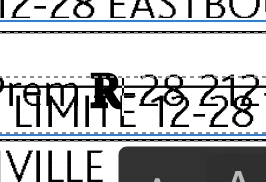
when I double click text In a PDF to edit It It moves the text box under the selected text slightly so when I enter text It doesnt line up correctly. And It also deletes the entire line when I start typing Instead of just the highlighted characters. Any help? I was also hoping to do a font match but that doesnt seem to be working either.


Thanks
 

    Correct answer Meenakshi0101

    Hi dfnjdfbs,


    Thank you for the screenshot.

    You can extract pages from the PDF and send them to us. For assistance, please follow the steps provided here: Extract pages from PDFs.: Extract pages from PDFs.


    Let us know if you need any help.


    Thanks,

    Meenakshi

    4 replies

    dfnjdfbs
    dfnjdfbsAuthor
    Participating Frequently
    June 3, 2026

    hey guys, I wanted to see If you were able to figure out what the Issue Is yet with the pdf? There Is a correct answer marked above but It Isnt the correct answer.


    Let me know If you need anything else from my side


    Thanks

    Meenakshi0101
    Community Manager
    Community Manager
    June 3, 2026

    Hi dfnjdfbs,


    Thank you for your patience.


    We checked the file and see that it was created from a third-party application. Also, the font used in the PDF is unavailable, which is why the text is displaced. As it is a PDF-specific issue, nothing much can be done. 


    Thanks,

    Meenakshi

    dfnjdfbs
    dfnjdfbsAuthor
    Participating Frequently
    June 3, 2026

    so with the massive amount of functionality In the paid version of Acrobat there Is nothing you could even suggest trying?

    dfnjdfbs
    dfnjdfbsAuthor
    Participating Frequently
    May 28, 2026

    Did you get my direct message? I wasnt able to send an attachment through direct message. There Is no option for attaching 

    Anand Sri Bhattacharya
    Community Manager
    Community Manager
    May 28, 2026

    Hello ​@dfnjdfbs 


    You can upload the file to a cloud storage, and then share that link in a direct message. As of now, the attachment option is not available in direct/private message.


    Regards,

    Anand Sri.

    dfnjdfbs
    dfnjdfbsAuthor
    Participating Frequently
    May 28, 2026

    should I be sending It to Meenakshi or someone else?


    dfnjdfbs
    dfnjdfbsAuthor
    Participating Frequently
    May 17, 2026

    Hi Meenakshi and thanks for the response. I am not sure If maybe giving you a little bit larger of a screen shot will help. I also Included what the font match section shows In the drop down which seems a bit weird to me. I would send the whole pdf but some of the Info on a few pages Is personal. I can break the pdf Into separate pages If you know a way and can send the first page If you think that will help. Thanks again


    Meenakshi0101
    Community Manager
    Meenakshi0101Community ManagerCorrect answer
    Community Manager
    May 19, 2026

    Hi dfnjdfbs,


    Thank you for the screenshot.

    You can extract pages from the PDF and send them to us. For assistance, please follow the steps provided here: Extract pages from PDFs.: Extract pages from PDFs.


    Let us know if you need any help.


    Thanks,

    Meenakshi

    Meenakshi0101
    Community Manager
    Community Manager
    May 15, 2026

    Hi dfnjdfbs,


    Thank you for reaching out, and sorry for the trouble caused.


    This issue typically occurs when the text in the PDF consists of individually positioned text objects or fragments, rather than flowing as a continuous paragraph. When you double-click to edit, Acrobat attempts to reconstruct the text box, which may cause slight repositioning based on font metrics or hidden spacing.

    Please confirm if this is the case with this specific PDF. If so, could you share the PDF with us? We will review it and provide you with the correct information.


    If you have any questions or need further assistance, please let us know.


    Thanks,

    Meenakshi

    dfnjdfbs
    dfnjdfbsAuthor
    Participating Frequently
    May 27, 2026

    Hi Meenakshi, I was able to edit the pdf down to half of one page. I left enough on the page so you guys can see whats happening when trying to edit. I wanted to know If I can send the pdf direct In an email If possible just In case I did not delete everything properly. 


    Thanks again

    Meenakshi0101
    Community Manager
    Community Manager
    May 27, 2026

    Hi dfnjdfbs,


    You can share the PDF via private message. To initiate a private message, click on my profile icon and send message button.


    Let us know if you need any help.


    Thanks,

    Meenakshi
