Participant
July 24, 2026
Answered

When I attach a pdf to an email in Outlook, a large PDF icon appears right next to the text (usually the greeting) in the body of the email. It used to be a smaller, more condensed version that ran along the top of the email. How to fix?.


  • July 24, 2026
  • 5 replies
  • 50 views


    Correct answer Dave Creamer of IDEAS

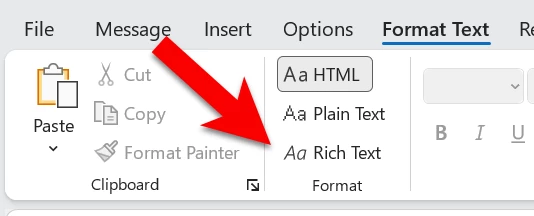
    Make sure your email is in HTML format and not RTF.


    5 replies

    Dave Creamer of IDEAS
    Community Expert
    Dave Creamer of IDEASCommunity ExpertCorrect answer
    Community Expert
    August 3, 2026

    Make sure your email is in HTML format and not RTF.


    David Creamer: Community Expert (ACI and ACE 1995-2023)
    Dave Creamer of IDEAS
    Community Expert
    Community Expert
    July 25, 2026

    Mac or Windows? I find this happens on my Mac. Usually, Windows will always attach. 

    David Creamer: Community Expert (ACI and ACE 1995-2023)
    YadooAuthor
    Participant
    August 3, 2026

    It’s Windows. Never had the problem before.

    Participating Frequently
    July 24, 2026

    That usually happens if Outlook is inserting the PDF inline instead of as a regular attachment. Try attaching the file using Attach File rather than dragging it into the email. If it only started recently, it may also be due to a recent Outlook or Adobe update. Restarting Outlook and checking for updates is worth a try too.

    YadooAuthor
    Participant
    August 3, 2026

    I always use the Attach File. Never drag and drop. If it was an Outlook update, then it would be a known issue, correct? I do close and open my Outlook email box at least once a day because sometimes it can be a bit temperamental if I don’t. I did recently have to uninstall Adobe and reinstall but that should have given the most current version. So if it worked before and doesn’t work now, oh I have a headache!!!

    Thanks for trying to help.