Participant
November 14, 2023
Question

When I click on pdf the test changes to unreadable

  • November 14, 2023
  • 1 reply
  • 315 views

I am using acrobat pro. I open a pdf. here is what it looks like:
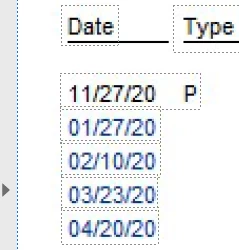
 

when I click on the doc, here is what it then looks like:
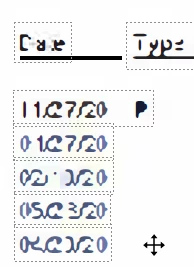
 

I want to copy all of the text so I can put it in Excel. if I select all, it again becomes unreadable.

and it does not copy the text. I have read the enhance and ocr and cannot find the correct options to make it readable and copy-able. I hope someone who is smarter than me can help.

thanks

san

This topic has been closed for replies.

1 reply

Amal.
Legend
March 12, 2024

Hi there


Hope you are doing well and sorry to keep you waiting.


If you are still experiencing this issue, we need more information.


Is this an issue with a particular PDF file or with all the PDFs? Please try with a different PDF file and check.


Also try to recreate the PDF from the original source file via Adobe Acrobat Pro and see if that works.
 
What is the version of the Acrobat DC you are using? To check the version go to Help > About Acrobat and make sure you have the recent version 23.08.20555 installed. Go to Help > Check for updates and reboot the computer once.
 
Also try to repair the installation from the help menu (Win Only) and see if that helps.


Let us know how it goes.


~Amal