Participant
January 2, 2018
Answered

When I print a PDF to a PDF file, the colors change

  • January 2, 2018
  • 3 replies
  • 992 views

Hi:

I was having problems with the page number search field finding the wrong page number in my PDFs.

I found that if I printed to a .ps and ran Distiller to create a PDF or just printed a PDF to a PDF file, the page numbering worked normally in the new PDF.

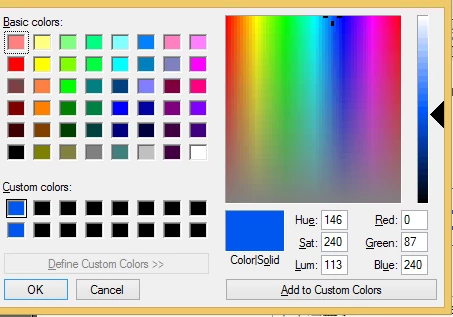
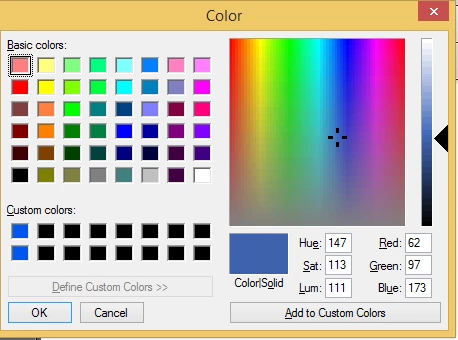
However, my heading font colors changed.

This is the original color of the headings:
After printing to .ps or to a PDF, these are my headings font colors:
Is there a way to keep the original colors?

Thank you,

Greg

This topic has been closed for replies.
Correct answer Dov Isaacs

Looks like the colors are being converted from RGB to CMYK. Generally, CMYK color spaces have much lower gamut (range of color) than RGB. Bright blues, bright greens, etc. simply don't reproduce with CMYK inks.

You didn't indicate what application you were producing PDF from, but in general, you are better off using an application's native save-as-PDF function or if supported the Acrobat PDFMaker plugin (such as for Microsoft Office applications).

Otherwise, you need to use Distiller joboptions that don't automatically convert RGB colors to CMYK.

          - Dov

3 replies

gjurbanAuthor
Participant
January 2, 2018

Hi Dov:

Thank you for the quick reply!

I am publishing to PDF from DITA Open Toolkit.

It uses FOP to create the PDF.

I tried various different settings in Distiller. Although the colors improved, they never were quite right.

Fortunately, I was able to find a way to fix the page numbering by going to the thumbnail page view in Acrobat and switching to 1, 2, 3 numbering.

So, no longer a problem.

Thank you,

Greg

Dov Isaacs
Dov IsaacsCorrect answer
Legend
January 2, 2018

Looks like the colors are being converted from RGB to CMYK. Generally, CMYK color spaces have much lower gamut (range of color) than RGB. Bright blues, bright greens, etc. simply don't reproduce with CMYK inks.

You didn't indicate what application you were producing PDF from, but in general, you are better off using an application's native save-as-PDF function or if supported the Acrobat PDFMaker plugin (such as for Microsoft Office applications).

Otherwise, you need to use Distiller joboptions that don't automatically convert RGB colors to CMYK.

          - Dov

- Dov Isaacs, former Adobe Principal Scientist (April 30, 1990 - May 30, 2021)
~graffiti
Legend
January 2, 2018

[Moved to Acrobat since it doesn't involve the free Reader]