
Inspiring
June 16, 2026
Question

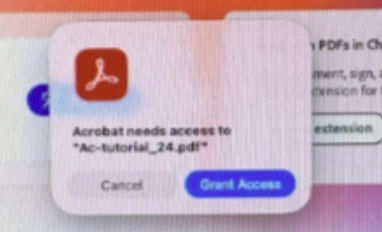
When the sandbox (Protected Mode Disabled) preference is enabled in Adobe Acrobat Pro, we are seeing Grant Access alert in Mac

  • June 16, 2026
  • 1 reply
  • 4 views

We are programmatically launching Adobe Acrobat Pro on macOS.

  • On some Mac machines, launching Acrobat also triggers an additional process called “Acrobat Helper.”
  • To stop this behavior, we disabled Sandbox / Protected Mode Disabled in Acrobat preferences, which resolved the Acrobat Helper launching issue. (As guided by Adobe Team)

However, this change introduces a new problem:

When Protected Mode Preference is enabled, macOS shows the “Grant Access” permission alert, but the Acrobat Helper issue is resolved.

When Protected Mode Preference is disabled, macOS does not show the “Grant Access” alert, but the Acrobat Helper issue reappears
 

1 reply

Amal Jaiswal
Community Manager
Community Manager
June 16, 2026

Hi there


Hope you are doing well, and thanks for reaching out and sharing this issue. 


Have you started experiencing this issue recently after the update, or was it occurring earlier as well? What is the version of the Acrobat app and the Mac OS you are using? Go to Help > About Acrobat and make sure its updated to the latest version  26.001.21662 Planned update, Jun 09, 2026 Go to Help > Check for updates and reboot the computer once.


Also, share a small video recording of the steps you are taking and the issue as it occurs for further investigation.

~Amal

Inspiring
June 19, 2026

Hi, This issue has been occurring from the beginning.

Acrobat Version : 2026.001.21662

Startup Preference OS Version

Result 

Protected Mode Enabled

Mac OS Tahoe 26.3 (M1) / Mac OS Sequoia

Grant Access alert observed and launching Acrobat helper issue is resolved

Protected Mode Disabled

Mac OS Tahoe 26.3 (M1) / Mac OS Sequoia Grant Access alert is not observed and instead of Acrobat pro it is launching Acrobat helper
Community Manager
June 19, 2026

Hi ​@Mike Lauer

Thanks for sharing the detailed information, this is helpful. 

Do you see the "Grant Access" dialog when working with certain workflows or opening PDF files from specific locations? If so, please provide details about those workflows or locations. Alternatively, do you notice the "Grant Access" dialog appearing when launching or opening PDF files from anywhere? We typically observe the "Grant Access" dialog when interacting with office applications, that is expected behavior due to changes in permissions implemented by Microsoft and those also shouldn’t be appearing.

While we discuss this internally, could you please share the dianostic logs with us.

  1. Acrobat version installed. To Check Acrobat > About Adobe Acrobat
  2. To collect the logs:
    1. Download and run the Diagnostics Utility from:  https://helpx.adobe.com/acrobat/kb/acrobat-diagnostics.html
    2. Click on Start Diagnostics. Ensure advanced logging is checked.
    3. Launch Acrobat, reproduce the issue with your file.
    4. Once done, click Stop Monitoring.
    5. Copy the Log ID and share it with us.


Thanks for your patience. 

~Tariq