


Participant
August 27, 2024
Answered

Where can I find Distiller?

  • August 27, 2024
  • 3 replies
  • 4818 views

Hello, 


I am setting up a MacBook Pro. I have a Creative Cloud subscription which includes Adobe Acrobat Pro. Based upon the research that I have done online, I believe that Distiller should be somewhere within the Acrobat Pro app. If anyone knows how I can open Distiller please provide very specific instructions (screen shots would be appreciated). I need to convert a postscript into a pdf. Thanks.

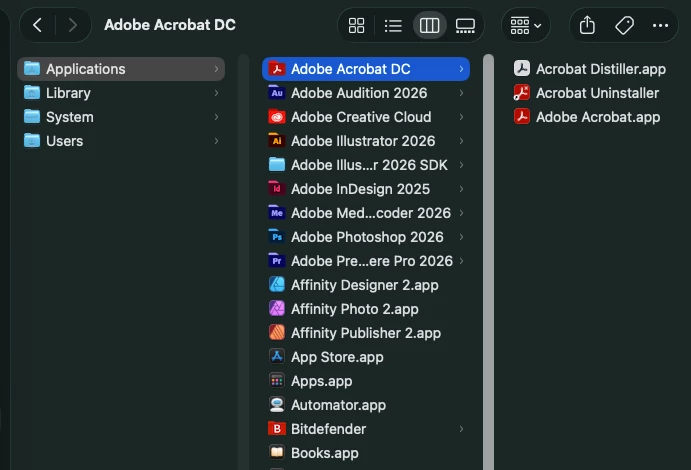
Correct answer Randy Hagan

It’s there. But as a stand-alone app.


Go to your Applications folder. Click on the folder for Adobe Acrobat DC to open it.


Acrobat Distiller.app should be in there. Double-click on the app and you’re good to go.


Randy

3 replies

Randy Hagan
Community Expert
Randy HaganCommunity ExpertCorrect answer
Community Expert
September 24, 2026

It’s there. But as a stand-alone app.


Go to your Applications folder. Click on the folder for Adobe Acrobat DC to open it.


Acrobat Distiller.app should be in there. Double-click on the app and you’re good to go.


Randy

Participant
September 24, 2026

For the Mac the search option is:  opt+spacebar

Legend
October 10, 2024

Hi @natalie_5648, 


Sorry for the delayed response. 
Since you are using a Mac, Try the Search option: Command + Spacebar > Search, type Distiller. If Acrobat is installed, you should be able to see Distiller as the first option in search results. 


Alternatively, launch Finder > Application > Adobe Acrobat > Expand the folder and you should be able to see Acrobat Distiller. 

Let us know if you have further questions.


~Tariq