


Participant
October 16, 2026
Answered

Where did the Save tool go?

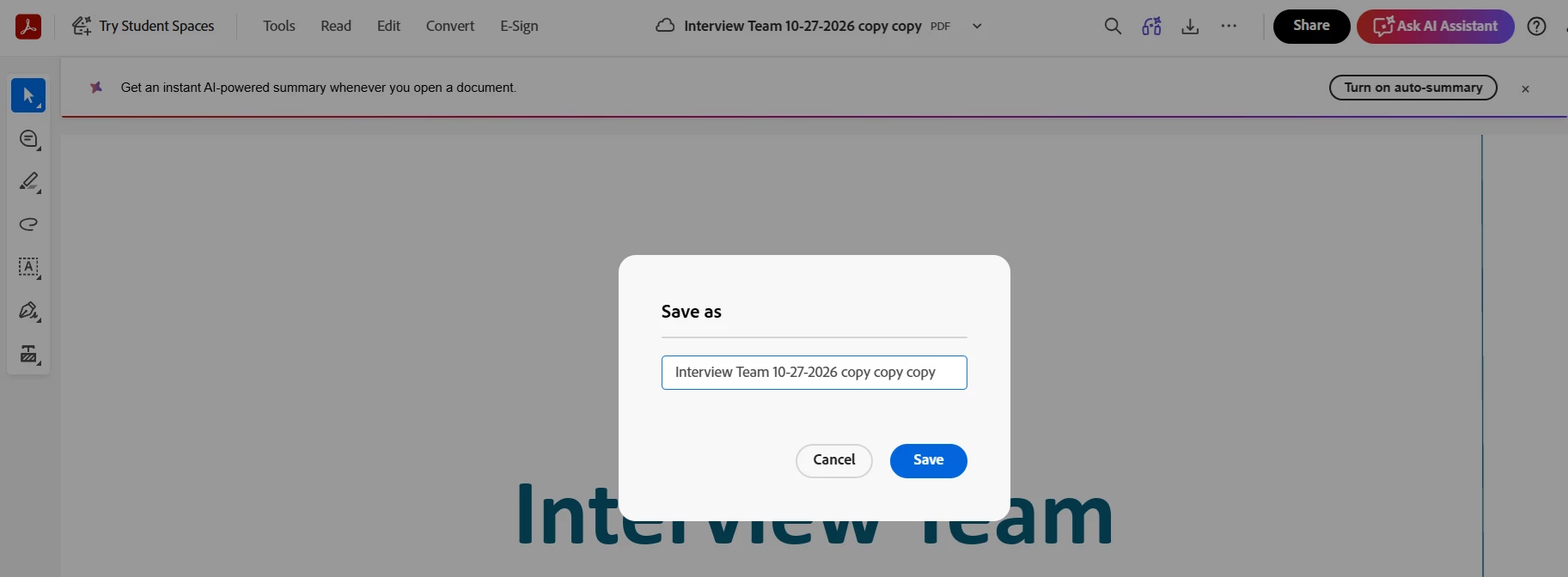
In the old Adobe, the "Save" feature allowed a person to choose where to save files. Now, the "Save As" doesn't allow it to save anywhere except Adobe's cloud. And then when I go there to try to move it to a specific folder, I cannot now figure this out. It is not intuitive. I have a PhD, I do research for a living, and I LITERALLY have spent the past 10 minutes trying to save a PDF to a specific location on my computer. I resorted to downloading it, going to my downloads, having to click and drag it to a folder (because god forbid, if I open it in my Downloads, the stupid Adobe options still don't let it be saved anywhere specific). Really terrible update. And I get a ton of pop-ups. I don't need all of the pop-ups, I don't need your new features, I just need to SAVE A FILE!! And, lets be clear-- I don't need files in your cloud-- I need them in mine.


I attach an image of the terrible 'save' feature. It only lets me change the name! You can see I've tried this multiple times and ways (hence the copy copy copy). Ridiculous waste of my time.
 

    Passionate_Gem2755Correct answer
    Participant
    October 16, 2026

    That small dialog with only a file name box is the cloud save prompt. You can switch it back to the normal Windows/Mac save window: go to Edit > Preferences > General (Acrobat > Settings on Mac, or Menu > Preferences in the new layout) and untick "Show online storage when saving files". After that, Save As should open the regular dialog where you can pick any folder on your computer.

    2 replies

    Passionate_Gem2755Correct answer
    Participant
    October 16, 2026

    That small dialog with only a file name box is the cloud save prompt. You can switch it back to the normal Windows/Mac save window: go to Edit > Preferences > General (Acrobat > Settings on Mac, or Menu > Preferences in the new layout) and untick "Show online storage when saving files". After that, Save As should open the regular dialog where you can pick any folder on your computer.

    Translate
    Amal Jaiswal
    Community Manager
    Community Manager
    October 16, 2026

    Hi @Serendipitous_Dolphinaafb

    I hope you are doing well, and thanks for taking the time to explain this. Spending ten minutes just to save a PDF to the folder you chose, and having to drag it out of Downloads, is a frustrating experience, and I appreciate you sharing the screenshot.

    Saving a copy to your own computer is still available. Based on the current Acrobat help:

    • On Windows, select the Menu (hamburger) icon > Save As, then specify the name and location and select Save. The Save to computer option in the upper right also saves your changes locally.

    • On macOS, select File > Save As.

    • Saving to Adobe’s cloud storage is a separate option (the cloud icon in the Global bar, or Save As > Adobe cloud storage), so it should not replace the local option.

    Details are here: Saving PDFs in Adobe Acrobat and Reader.

    If your Save As dialog only lets you rename the file and shows no way to pick a folder on your computer, that is not the expected behavior, and I would like to look into it. Could you please share:

    • Whether you use Windows or macOS, and which version.

    • Whether this is Adobe Acrobat or Acrobat Reader, and the version go to Help > About Adobe Acrobat and make sure it's updated to the latest version 26.002.22031 Planned update, Oct 14, 2026 Go to Help > Check for updates and reboot the computer once.

    • If it still doesn't work, please share a small video recording of the steps you are taking and the issue as it occurs for further investigation.


    Regards,
    Amal

    Translate