Participant
June 2, 2018
Answered

Where has the "duplicate page" option gone? It was SO easy before just to click "duplicate" why on earth would anyone change that? how do I duplicate a page I am working on in A Pro X1

  • June 2, 2018
  • 3 replies
  • 98693 views

Where has the "duplicate page" option gone? It was SO easy before just to click "duplicate" why on earth would anyone change that? how do I duplicate a page I am working on in A Pro X1?

This topic has been closed for replies.
Correct answer AnandSri

Hello Jamesjolly,

Sorry for the delayed response and inconvenience caused. As per the description above, you want to copy/duplicate a PDF page using Acrobat Pro DC on Mac machine, Is that correct?

As correctly mentioned by Gilad D, you can open the Page Panel, and click the page and drag it while holding the CTRL key(for Windows).

For Mac: hold down the fn+option keys and click and drag the page you want to duplicate.

You can also copy a page within a PDF using page thumbnails:

  • Open the PDF in Acrobat DC, and then choose Tools > Organize Pages or choose Organize Pages from the right pane.
  • The Organize Pages toolset is displayed in the secondary toolbar and the page thumbnails are displayed in the Document area.
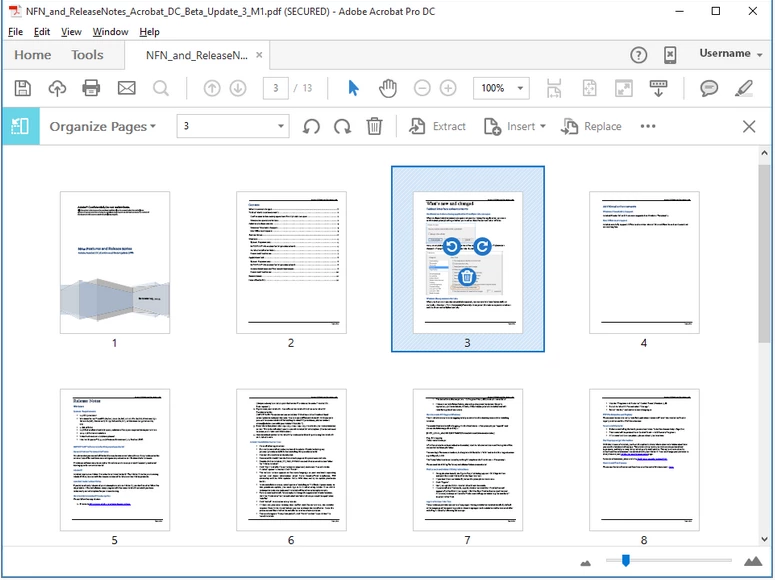
Document area changes to display page thumbnails.

  • Select one or more page thumbnails.
  • To copy a page, Ctrl-drag the page thumbnail to a second location.

For detailed information, you can refer to the following Adobe article Rotate, move, delete, and renumber PDF pages in Adobe Acrobat

Let us know how it goes and share your findings.

Regards,

Anand Sri.

3 replies

Participant
September 22, 2022

why is adobe so freaking complicated? Every time you want to do something simple one is required to follow some torturous set of steps.   All we want to do is copy a page out of a pdf and transfer it to an email (in this case, using Macbook).  You sit there for an hour trying to figure out which 8 steps you need to copy one page.  Its not counter intuitive, its non intuitive.  Ridiculous.  Does anyone know if there is an alternative to Adobe?

Bernd Alheit
Community Expert
Community Expert
September 22, 2022

You can drag and drop the page.

Legend
September 22, 2022

But you can't drag it to a mail. Use the file as an attachment in the usual way. 

AnandSri
Community Manager
AnandSriCommunity ManagerCorrect answer
Community Manager
June 5, 2018

Hello Jamesjolly,

Sorry for the delayed response and inconvenience caused. As per the description above, you want to copy/duplicate a PDF page using Acrobat Pro DC on Mac machine, Is that correct?

As correctly mentioned by Gilad D, you can open the Page Panel, and click the page and drag it while holding the CTRL key(for Windows).

For Mac: hold down the fn+option keys and click and drag the page you want to duplicate.

You can also copy a page within a PDF using page thumbnails:

  • Open the PDF in Acrobat DC, and then choose Tools > Organize Pages or choose Organize Pages from the right pane.
  • The Organize Pages toolset is displayed in the secondary toolbar and the page thumbnails are displayed in the Document area.

Document area changes to display page thumbnails.

  • Select one or more page thumbnails.
  • To copy a page, Ctrl-drag the page thumbnail to a second location.

For detailed information, you can refer to the following Adobe article Rotate, move, delete, and renumber PDF pages in Adobe Acrobat

Let us know how it goes and share your findings.

Regards,

Anand Sri.

Participant
March 17, 2021

This doesn not work. As someone else has asked, why on Earth would the duplicate page button be gone? It was so easy, and such a necessary command. ARG!!!!!

Bernd Alheit
Community Expert
Community Expert
March 17, 2021

A duplicate page button was never available in Adobe Acrobat.

try67
Community Expert
Community Expert
June 2, 2018

Open the Pages panel, make sure the zoom level is such that the entire page is visible, click the page and drag it while holding down Ctrl. When you drop it a copy of it will be added to that location.

Participant
June 2, 2018

really appreciate the help, but no, doesn't work, Im using A DC on a mac.

Participant
June 2, 2018

i have ONE page done and I'm trying to simply duplicate it as a second page