



JR Boulay
Community Expert
Community Expert
July 8, 2026
Question

Where has the Select form fields tool gone ?

  • July 8, 2026
  • 4 replies
  • 98 views

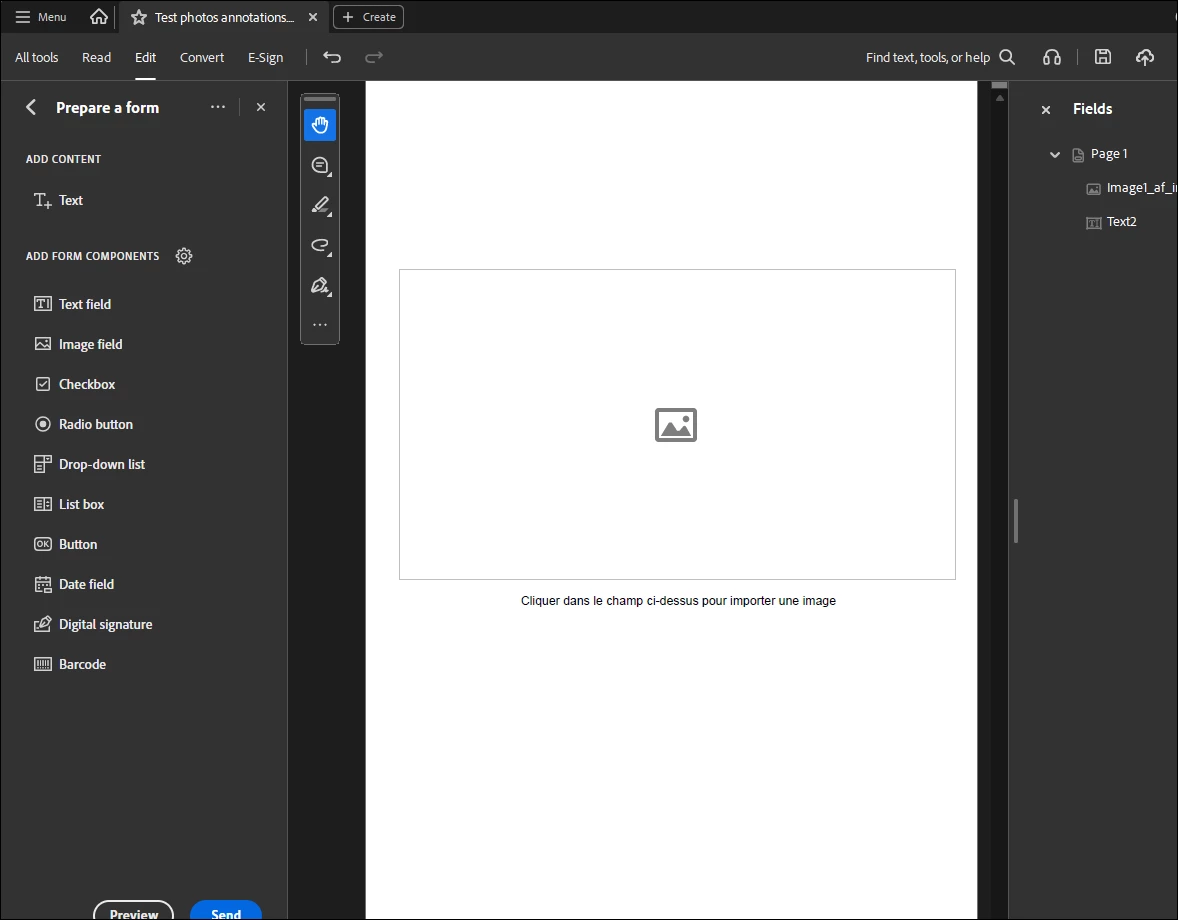
Where has the select form fields tool (the black arrow) gone?
The new Acrobat is really annoying because it’s still missing some basic features.
After all this time, it’s incomprehensible.

I’ve tried to get used to it again, but once more I’m going to “Disable new Acrobat”…

☹️


    4 replies

    Meenakshi0101
    Community Manager
    Community Manager
    July 13, 2026

    Hi JR Boulay,


    Hope you are doing well!


    We are sorry to hear that you are experiencing this issue.

    The "Select Text" tool should still be available in the floating toolbar within the "Prepare a Form" tools, as it has not been removed. We understand that you may have already attempted some troubleshooting steps. Could you please try reinstalling the application and let us know the results?

    Additionally, could you confirm the versions of Acrobat and your operating system? Also, please check if the option is still missing when you open a text PDF.


    We look forward to your response.


    Thanks,

    Meenakshi

    JR Boulay
    Community Expert
    JR BoulayCommunity ExpertAuthor
    Community Expert
    July 23, 2026

    Meenakshi0101

    Yes, I agree. It should be available, but it isn’t.


    As I’ve already explained below, I’m aware of the possible workarounds (keyboard shortcuts, custom tools).
    What I’d like is for my trainees to be able to find this tool where it should be, without looking incompetent and without wasting time because of the software’s shortcomings.


    I can’t uninstall and reinstall Acrobat on their work computers; I can do whatever I like with my own, but that won’t solve the problem.

    I use Acrobat 26.00121691 for Windows 11 Professionnel, 25H2, Build 26200.8655

    The trainees are certainly using the same versions, as their computers and software are up to date, but I can’t check that right now (It’s the holiday season here).


    Thank you


    Acrobate du PDF, InDesigner et Photoshopographe
    Meenakshi0101
    Community Manager
    Community Manager
    July 23, 2026

    Hi JR Boulay,


    Thank you for the confirmation.

    Please allow us some time to discuss this with the team. We will get back to you with more information.


    Thanks,

    Meenakshi

    Thom Parker
    Community Expert
    Community Expert
    July 8, 2026

    I’m on Win11 as well. I think you are referring to the “Select Object” tool? It’s automatically selected in “Prepare Form” mode. Only it doubles as the select text tool.  On my setup, even if I select the hand tool, the select object tool stays active.  If a form field is placed, then I have to click on the “Select Text” tool to get the select object tool back. It’s stupid, but what are you going to do?


     This tool is also available outside Prepare form mode. In the old Acrobat it’s found on the “Rich Media” tools, and the tool search still says that it’s there, but I don’t see it in the new UI.  So, I use the keyboard shortcut, the “r” key.    Hope this helps. 


    Thom Parker - Software Developer at PDFScriptingUse the Acrobat JavaScript Reference early and often
    JR Boulay
    Community Expert
    JR BoulayCommunity ExpertAuthor
    Community Expert
    July 10, 2026

    Thank you.
    I know I can use ‘R’ to access this tool, but I can’t show my trainees how to access it if I don’t have it displayed on the screen in front of them!

    Acrobate du PDF, InDesigner et Photoshopographe
    Thom Parker
    Community Expert
    Community Expert
    July 10, 2026

    Ha!! Figured it out. Not Ideal, but the Select Object tool can be added to the vertical toolbar with the customize option.


    Thom Parker - Software Developer at PDFScriptingUse the Acrobat JavaScript Reference early and often
    Randy Hagan
    Community Expert
    Community Expert
    July 8, 2026

    The way I’ve been explaining it to my clients and students, it’s not so much that Adobe has deleted features in Acrobat as it’s distributed them between the new and old interfaces. 


    It’s a bother, to be sure. but I find if the folks I work with know that and can toggle back and forth with a couple of keystrokes. It cuts down on their frustrations a lot.


    Randy

    Dave Creamer of IDEAS
    Community Expert
    Community Expert
    July 8, 2026

    No problem on my system. 


    David Creamer: Community Expert (ACI and ACE 1995-2023)
    JR Boulay
    Community Expert
    JR BoulayCommunity ExpertAuthor
    Community Expert
    July 8, 2026

    You are a lucky guy!

    (I’m using Windows 11)

    Acrobate du PDF, InDesigner et Photoshopographe
    Dave Creamer of IDEAS
    Community Expert
    Community Expert
    July 8, 2026

    I would chalk it up to good living, but I know too much about what I do… 🤣

    David Creamer: Community Expert (ACI and ACE 1995-2023)